> Great! We always need help. In order to find something that you find fun and rewarding to work on, a good first step is to find out which itch you have with Plasma Bigscreen, and how it can be scratched. What's nagging you? Now give us a shout-out, best via the Plasma mailing list. You can also make yourself known in the Matrix channel. There's plenty to do, tasks for every skill and level, and you'll find it's fun to work on and learn from each other.
https://plasma-bigscreen.org/contributing
1. Open issues on Gitlab:
https://invent.kde.org/plasma/plasma-bigscreen/-/issues
2. Join the Plasma mailing list here:
https://mail.kde.org/mailman/listinfo/plasma-devel
3. Join the Matrix channel and say you want a task here:
For a moment though I thought that this story was about the launch of a new plasma TV 'big screen' and it got me really excited.
I don't understand why there aren't more folks like us shouting it from the rooftops. It's almost bizarre how good it looks.
KDE drops a new point release with new features ~ every four months, and has a more flexible release schedule, so it is just to just get the changes when they are released.
I'm currently running KDE on NixOS unstable which is great, but if I weren't doing that I'd still be on OpenSUSE Tumbleweed.
I use CachyOS in my ThinkPad and in my Framework Desktop, for work. A stellar OS, has great defaults, is very fast and prioritizes KDE although you can do other WMs too if you're adventurous.
Seems to me a 10-foot interface almost by definition doesn't need the complexity of a KDE; you need to launch apps from "big rectangles on the screen" instead of like a Start Menu(and probably configure those to be 10 foot friendly) -- and MAYBE a few widgets and that's it.
I've always wondered why that doesn't seem to exist, and now probably with vibe coding may just work on it myself.
Really if someone made a WebKit “core” and a Jellyfin client “core” (which, actually, you might get “for free” with the browser if you can tolerate web bloat on your platform) under libretro it’d be a pretty damn capable set-top-box UI. All the “cores” right now are games/emulators, but they don’t have to be.
regular kde is usable enough on my tv from the couch, just bump font size and 200% scaling. done.
these ideas are reminiscent of a time people thought kiosk modes were a good idea.
what one call complexity most people can being able to do anything at all.
Maybe FLTK/FLWM can be interesting as well.
Plasma is exactly what I don't want in a DE. It’s extremely configurable, but also overwhelming, and I don’t think that’s something the average user would feel comfortable navigating.
I ended up choosing GNOME. It feels visually cohesive, and the design is much more opinionated — they’ve clearly made decisions about what should and shouldn’t be part of the core desktop experience.
Right now the systray has a very ugly delay when opening applets like WiFi or sound. Up to 1.5 seconds (!). This doesn't happen with the applets bare in the menu bar, so there must be some sort of negative interaction there between the systray code and applet code.
This is on a bog standard KDE install too.
I don't like Gnome's high and mighty attitude either, especially because it chases people away from making bug reports or contributing. And when 90%+ of your users uses a particular extension (Dash to Dock), maybe make that behaviour integrated and the default.
At this point my hope is squarely aimed at PopOS' COSMIC environment.
It's fine giving lot of customization but the default got to be good, and at the opposite (gnome) it's fine to give no customization option as long as it's well thought out and makes sense.
Sadly, it's neither the case.
The best I could find was cinnamon desktop, they're not too bad.
But I do think some of the systray things are overly complicated. E.g. why does the volume widget list all audio outputs and inputs by default?
On the other hand some things are really great. E.g. which other DE lets you adjust the screen brightness (the real one via DDC/CI) from the systray, or start video screen capture by pressing print screen?
KDE is definitely better than gnome at this point.
Now I'm using Cinnamon until the bug gets fixed which I enjoy too but it doesn't come close to the ease of use of KDE. And when I say ease of use on KDE I refer to the fact that out of the box you can pretty much do everything you need to without having to search for extensions or hunt for settings, someone already thought of what you wanted to do and made it straightforward to do. Sure it's overwhelming to be presented with a lot of things at once e.g. the screen capture UI but when you need to do something that's not the base case it's easy to see that the UI has got you covered.
[0]: https://www.reddit.com/r/NixOS/comments/1pdtc3v/kde_plasma_i...
Both of these work for me on Gnome 49.
I really like this about KDE. And the number of options isn't in the way. When I'm thinking of something new to do there's usually an option for just that that I'd never seen before. I love software like that that feels way ahead of me, almost anticipating my wishes.
Gnome on the other hand, their developers have this attitude of "you shouldn't want to do this". I don't like software or other people telling me what to do. I'm sure their stuff is based on UI principles but those are made for the masses too. I only care about what works for me.
But yeah I'm a power user, that's not for everyone. I love that KDE exists though. And it's great that you like gnome, that's the power of Linux/FOSS.
The only thing I object to is when people claim Linux should get one standard UI (and then they usually want that to be gnome). That's not ok for me. But it's also impossible to enforce anyway.
I don't mind changing things on KDE, but the defaults are useless to me. Too many annoying things, all those time-wasting gimmicks, on-hover uselessness. It is clearly written for another target audience, e. g. Average Joe coming from Windows. While that is fine perhaps for those users, to me the default is useless. And I think many others feel in a similar way. To me the defaults in GNOME are even worse though, so it is a lose-lose scenario. But things can be configured, so that problem can be solved for most settings or behaviour; I am just not convinced that sticking to the defaults works that well.
I add a "keep window above others" button to the window title bar and set the "menu" key on my keyboard to be Compose.
People act like these issues are going to "stop the Linux migration" or otherwise, and then they give examples of things that most users will never do/isn't even possible on windows / mac
It feels like most people don't like some DE's just simply because it's not what they're used to, not because there is actually a problem with them
I have found KDE excellent and intuitive from the get go without much customization. To me GNOME is very primitive in comparison and ugly too.
KDE is the DE that made shed the bias again linux UIs as having that crummy look that set them apart from commercial desktops.
Sure it has issues (which mostly crop up when you are doing deep customization) but for the basics I don't even think any other Linux DE come close.
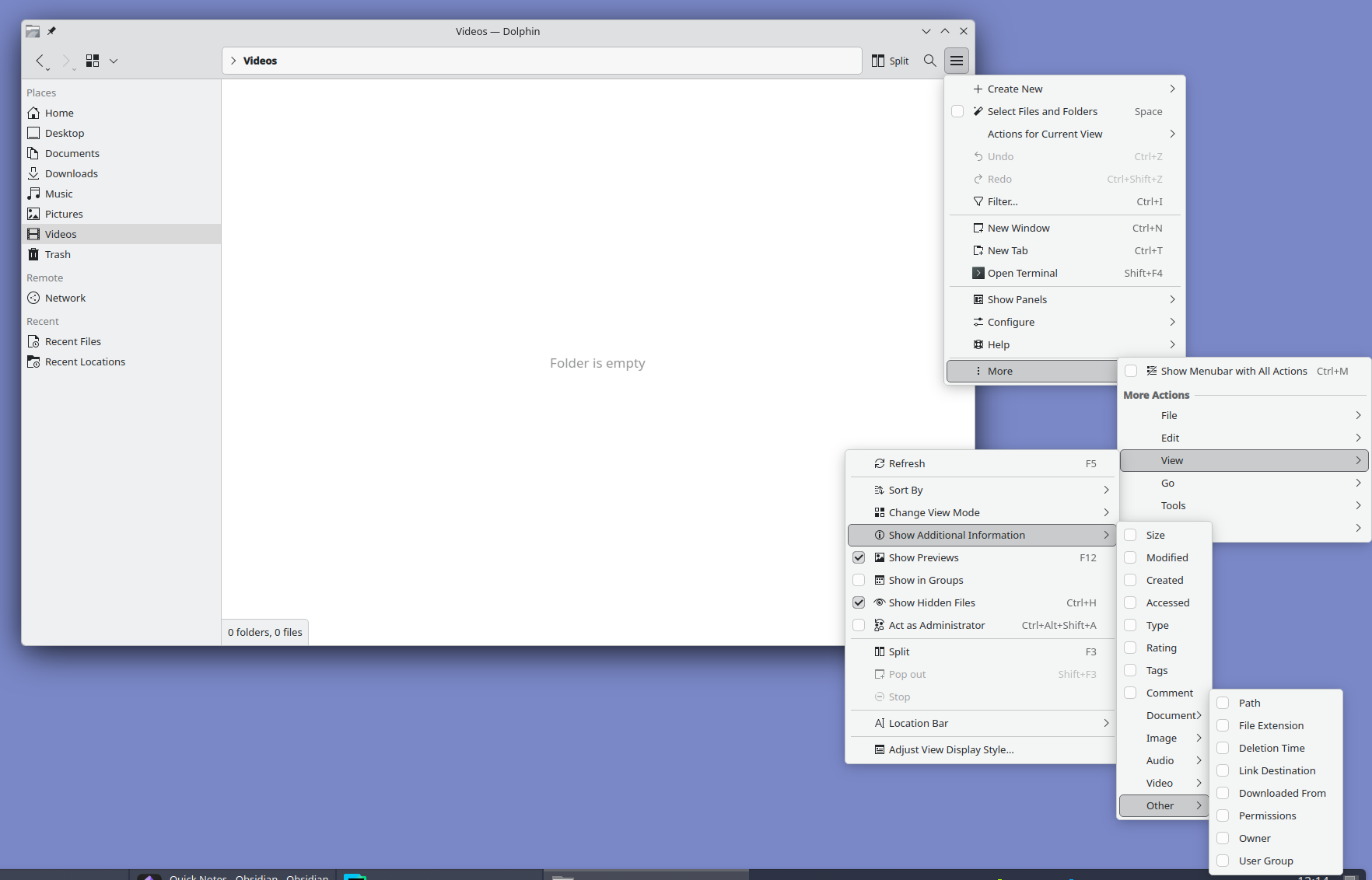
Look at it and tell me this is normal. I love Plasma but oh man do they need to hire a real designer. Someone with balls to unfuck the interface and move all advanced settings out of GUI into a well documented config file.
The sibling comment, meanwhile, is complaining about extra space devoted to explicit controls for all of the extra options. Well, you can't have it both ways. If you want to have a lot of features and options, you have to either devote some space in the main UI to them, or have a lot of deeply nested menus like that.
Or I guess you could do a config file somewhere, but IMO that's even worse. If we're going to complain about bad UIs, isn't it even worse than some deeply nested menus to need to open a separate file somewhere else with a separate program and learn whatever config file syntax they happen to use.
I'd rather have all that mess removed and settings 1% of the user base "needs" moved to a config file. I don't want to add an another layer of complexity with external configuration tools.
Konsole on left, ghostty (which is gtk) on right. The latter has at least 3 additional lines visible outputting the same command. The giant copy paste buttons, tab bar which wastes a ton of space, are typical of kde apps. The klutter isn’t just visually annoying it makes the apps less useful.
There's plenty of valid criticism of GTK but choosing C over C++ isn't one of them. It seems like there is a new Rust GTK app every week, and other languages as well, thanks to the availability of bindings.
I'm curious how long relying on C++ contributions is going to last.
And then kmail... kmail is bad.
No alignment issues, menus sorted by professional designers, easier to learn UX like ribbon menus and a lot more.
Feel like the design issues stem from it being shaped by existing power users. Familiarity tend to downplay design issues so stability took priority, even though the UX never should've been stabilised in the first place.
I don't want to be negative for the sake of it but I constantly read these really positive comments about Linux on the desktop (in general or in specifics) and it gave me a false impression of what to expect. Not the first time I've fallen for this either over the years.
I haven't compared those two with XFCE recently, but they all seem fine these days.
It’s got 4GB RAM and a modest Intel i3.
KDE runs flawlessly. While modern web browsers struggle with more than a few tabs open.
Meanwhile, Gnome just works exactly like you'd expect it to. I said it before already, but Gnome is for people moving from macOS and KDE is for ex-Windows veterans. And, for the record, I don't want to praise Gnome's overly-minimalistic approach, either, which too gets annoying when you have to find an extension for every stupid extra setting beyond the defaults. But, all in all, I much prefer it over KDE and wouldn't switch back. Not to mention the aesthetics, because there's no comparison if one shares the Apple/Braun ideals on design.
A plot twist here is that I am also a KDE app developer...
For comparison, MacOS doesn't have a printscreen key, it's command-shift-3 or command-shift-4. Much more confusing to newcomers in my experience.
There might be a small misunderstanding regarding the "dialog". Once you've selected an area you're shown the outlines & can still modify them, and the buttons (Accept (for further editing in Spectacle), Save, Save As, Copy, Export) are shown below those outlines.
This approach seems objectively superior to your suggestion.
Sounds borderline implausible. If anything, that's not a typical user user case by far.
Okay? Weird comment.
> If anything, that's not a typical user user case by far.
The scale may not be typical, but the pattern (many more screenshots copied to clipboard than saved as a file) is something I see across all kinds of users around me, be they technical or even very much non-technical.
Let's not turn the defaults into "The Homer", okay? Allowing the user to choose their preferred action in the same step as allowing them to change the outline doesn't make things unnecessarily confusing, doesn't add unnecessary clicks, or anything else.
Linux has a DE like GNOME. How many DEs like GNOME does it need?
There's a lot of "we need this" "we need that" in the open-source world. But when you look at all the limitations objectively, we've already reached the highest point we can achieve.
Your whataboutism doesn't invalidate my critique.
I was responding to your belief that somehow Gnome is better or that "Gnome just works exactly like you'd expect it to," as you stated. My point is that it does not. And you might not find Desktop icons useful, but I (and millions of other people!) use them every day and have for decades. I could drag and drop icons on the desktop of my family's first computer, a Mac that ran System 7 in the early 1990s. And then our Windows 95 box. And then Windows 98, and 2000, and XP, and a laptop that ran Vista. And then that laptop running Ubuntu with Gnome 2, and then Ubuntu Unity, and then Gnome 3... until Gnome decided, nope, sorry!
KDE Plasma has really hit the sweetspot for me, it's super usable daily and still has easy customisability. Thanks to all the effort poured into Proton I have even replaced my gaming PC with Arch/KDE plasma with really very little stress.
I am VR gaming, on linux, on AAA titles, with no messing around, if this isn't the year of linux desktop then it will never be.
I don't really think a specific TV like interface would make it more user friendly really. It is much faster to browse and select files than on any remote based interface I have ever used on dedicated devices (or video game consoles). Turns out we have never made any better device than a keyboard to type search words :-)
I could use kdeconnect to control a lot of stuff like volume / play/pause / next buttons from my smartphone but I don't even do that as the keyboard+trackpad combo is always available next to me anyway.
Make it easy so my aging tech illiterate parents can use it (looks like it does the job, at least as well as any other) but also hackable for people like us, to fix bugs and drive innovation.
My TV is currently a monitor for my computer, so something like this even works for me in the same way steam big picture does. For work, I ssh in. One thing that helps is I use ydotool and my phone and laptop can easily be a keyboard
Anyway, I will try it in its current status. I basically need a launcher for the desktop Jellyfin app and not much more
Right now I use an AppleTV with Kodi installed via developer account. Unfortunately, Kodi on AppleTV is not well supported so it crashes a ton. I'm not much of an Apple dev. After much gnashing of teeth I managed to get a from source build running so I could maybe look into why it crashes and contribute but I've never debugged an AppleTV app and even trying to switch to using the simulator which I suspect is better for debugging, I couldn't figure it out.
But, quite often I just wish to get some other small box for Kodi. Except I don't want 2 boxes, one for Kodi and one for other proprietary apps (Crunchyroll, Twitch, Netflix, ...)
Any suggestions?
It’s not free, though. But it’s far more stable and nicer to use than Kodi ever was in my experience. I ran Kodi for my home theatre for years but switched to AppleTV+Infuse and never looked back.
For free (and open source!) options you can use the Swiftfin tvOS app and a Jellyfin media server.
It's a bit backwards but I did it for years, and it works really well if you're ok with the Kodi experience.
Jellyfin, at first with the official client on Roku then on Infuse on AppleTV when x265 hardware decoding started becoming a requirement (my server is too weak to transcode) has been everything I wanted Kodi to be. Web interface is great, I share it with a couple friends over Tailscale. Wife and kids and visitors use Infuse, no problem, no complaints, no help needed. My use-to-fiddling ratio is probably literally 100x better than with Kodi. I have spent overall less total time messing with it than with Kodi, even including figuring out solutions for things like YouTube videos.
That's just Kodis default behavior on any platform.
“Plasma” just refers to the desktop environment: https://kde.org/plasma-desktop/
So this is a “Big Screen” UI for KDE Plasma.
Bought it as an intern dirt cheap off of some dude at my company who posted it in a email group. He upgraded to the latest and greatest and just wanted it hauled out. Picture quality (for the time) was incredible!
It also doubled as the worlds best space heater. My god it was power hungry.
It's great that they work on a tv ui for kde but I feel like it's really not going to work well on anything but a monitor with mouse and keyboard.
One of the best features I have ever seen.
I'm not being lazy here but I have reviewed this site and outbound links. And, I have reviewed the threads there.
I'm very interested in repurposing my LG Smart TV and have been hesitant about installing a software package on it.
If I brick the TV I'm fearful my kids will burn me at the stake.
I don't see a listed hardware matrix, but do see a link to enter into the matrix server and ask questions. I don't see packages or a repository to add.
I think llms generally produce quite a bit of slop content but I think they could be used to explain open source projects a bit better. This seems like an opportunity.
A remote control with wifi would work pretty easily by being connected into usb port, just like a wireless mouse.
Something like an ASUS NUC comes to mind for me but it’s designed to work with anything that you can install Linux on. https://www.ebay.com/sch/i.html?_nkw=asus+nuc&_trksid=p46248...
I wonder if you can then use Netflix and other streaming services? I have a Chromecast device and could probably just switch the HDMI to use that. I can use Netflix on my Linux laptop but I haven't tried Disney and I would very much doubt Apple+ would work on KDE.
> D-bus
alright!
on a more serious note, should remove that incase that was put there by AI.
[edit]
Unless this text was buried deeper than the front page and then promoted, I was wrong. That language was not there last November according to archive.org
It has a lot of problems especially with protocol standartization and permissions. You can tell something and you might get something back or you might listen for something and get garbage instead.
The maker of hyprland has shipped an alternative though. https://news.ycombinator.com/item?id=46278857
Like no tactile controls in cars, this was also a mistake for TVs
The fact that the apps I would actually care about having on real estate on my front room seem to be nowhere to be seen is kinda glaring from my perspective... I know there's a certain purism to having Firefox front and center... But really?
Another thing is that I've found certain old movies can only be streamed from weird websites - as in https://weirdstreamingwebsite is the only licensed entity to have it. I could either buy a VHS (which is what we did) or stream it. But since a physical copy might not be available, the only option would be to use that weird website to stream it. There is no app!
This (plasma-bigscreen) is going to fail, as 10-foot interfaces historically do. It is a waste of good developer time and focus.
Free Desktop people keep obsessing over ill-advised moonshots as a form of escapism; no one wants to address the fundamentally broken core desktop model. Papercut bugs are boring and solving them is thankless. Working on a shiny new TV mode interface looks better on a resume. Meanwhile the rest of the world is pulling their hair out over Windows 11 and macOS Tahoe because there are still no feasible alternatives for normal human beings.
Kodi is incredibly limited though, and does not come close to the flexibility of Plasma Bigscreen. The latter is just a UI optimized for using a PC from a couch, which means that you can use any regular desktop app, including Kodi, web browsers for streaming content, and Steam for playing games. Kodi on the other hand does not even allow you to play YT videos without using some buggy add-on that requires registering an API key with Google (no thanks).
It forces its limited model of text-based folders-with-files to everything. Also it's all Python, and I don't know if it's me but I always find quality issues first in Python projects than anything else. Error control is usually very lacking, and it's so frequent to see error pop-ups showing on here and there. You enter a menu and the first entry selected is ".." which is to go back to the previous menu (poor UX). All in all, Kodi for me has always been a player with good tech (it all basically works, surround sound, codecs, integration with hardware, etc), exposed as very amateurish UI experiences.
- Very often untrusted third party software downloaded via a forum link.
- Have no guarantee of long term support.
- Are another layer of complexity to learn and maintain which is completely not in line with what a TV interface should be.