I liked the glowing Apple logo touch. Perhaps if author wants to enhance this part they could mask off the Apple shape so there's less light bleed. But looks cool as-is.
I'm really tempted to build a modern computer into an HP Jornada case. I really miss that form factor. It's pocketable yet has a usable keyboard.
On one hand, it would’ve been cool.
On the other hand, at the time netbooks were becoming common and were essentially taking the spot of those kind of devices (jornada 728 etc).
Its screen is nice, and there looks to be plenty of room inside. I have been keeping an eye on options for putting something else inside. Its mostly the power delivery for the display that I think is beyond my skill that's holding me back.
https://community.frame.work/t/i-converted-a-macbook-into-a-...
But now I'm just thinking of it as a solid box with nice screen and keyboard attached.
But I like the idea of re-visiting Macbook plastic chassis w/ new inside.
I would love to know what the weight is in the end.
Can the old Macbook chassis lead to a lighter weight computer than the current 1.23kg Macbook neo and Macbook air?
Not the corners for me, but the "feet" of the topcase digging into the palmrest, which would splinter the plastic, then you'd have holes in the case and jagged plastic splinters digging into your wrist as you typed, not enjoyable.
This: https://ismh.s3.amazonaws.com/2014-02-24-macbook-topcase.jpg is exactly what mine had, on both sides.

Shame because it was the last macbook that was really easy to upgrade: the battery was removable (with a simple lock), and behind it were the RAM and 2.5" drive slots.
The next generation was not that hard but you had to unscrew the entire bottom shell, and the battery was glued.
It was my first Apple laptop and I have fond memories of using it during my college years.
Did the same years later buying up first gen iPod Nano and trading them in for sixth gen because of the battery recall.
https://www.cultofmac.com/how-to/exchange-your-cracked-macbo...
https://dylanbaileywrites.medium.com/sonshi-style-an-obscure...
I have an external Thinkpad USB keyboard with full-travel keys, a built-in trackpoint, 3 physical buttons, and no trackpad. It cost me about £60 new, 3 years ago.
I use it with my MacBook Air when travelling, and a cheapo external USB-C screen with a broken laptop mount.
The MBA is slim, light, and 3 years on, its battery still lasts several days. It's perfectly able to do 8-10 hours of near-continuous use. But the keyboard and trackpad are awful.
So, external keyboard, external screen, pocket USB-C hub to connect them, which also gives me a spare full-size USB port and Ethernet.
If you don't need the battery life, I suggest investigating a ?20 era Thinkpad.
The X220 is quite portable and though the screen is small the keyboard is great and the range of ports good.
The T420 is moderately portable, has a decent screen and the i7 has a discrete GPU. Works surprisingly well with Wayland these days.
The W520 is not really portable at all but has a lovely big screen, tonnes of ports, and quad-core models have 4 SO-DIMM slots so 24 GB is cheap and 32 GB doable.
For all, get an i7 model, fit 2 SSDs and max out the RAM, and the result is perfectly usable in 2026 if you're a gamer or "influencer" who needs to edit video.
Cost, £200 or so.
And there's the 701 DS which has 2 screens, a numeric keypad, and a Wacom tablet built in.
Hard to find and expensive, though.
that said, practice soldering, the insulation on those wires[0] and the sheer distance that they wicked solder upwards makes me really wonder how much heat got dumped into those tiny pads!
[0]: https://fb.edoo.gg/assets/images/image06.jpg?v=86ae0ddf
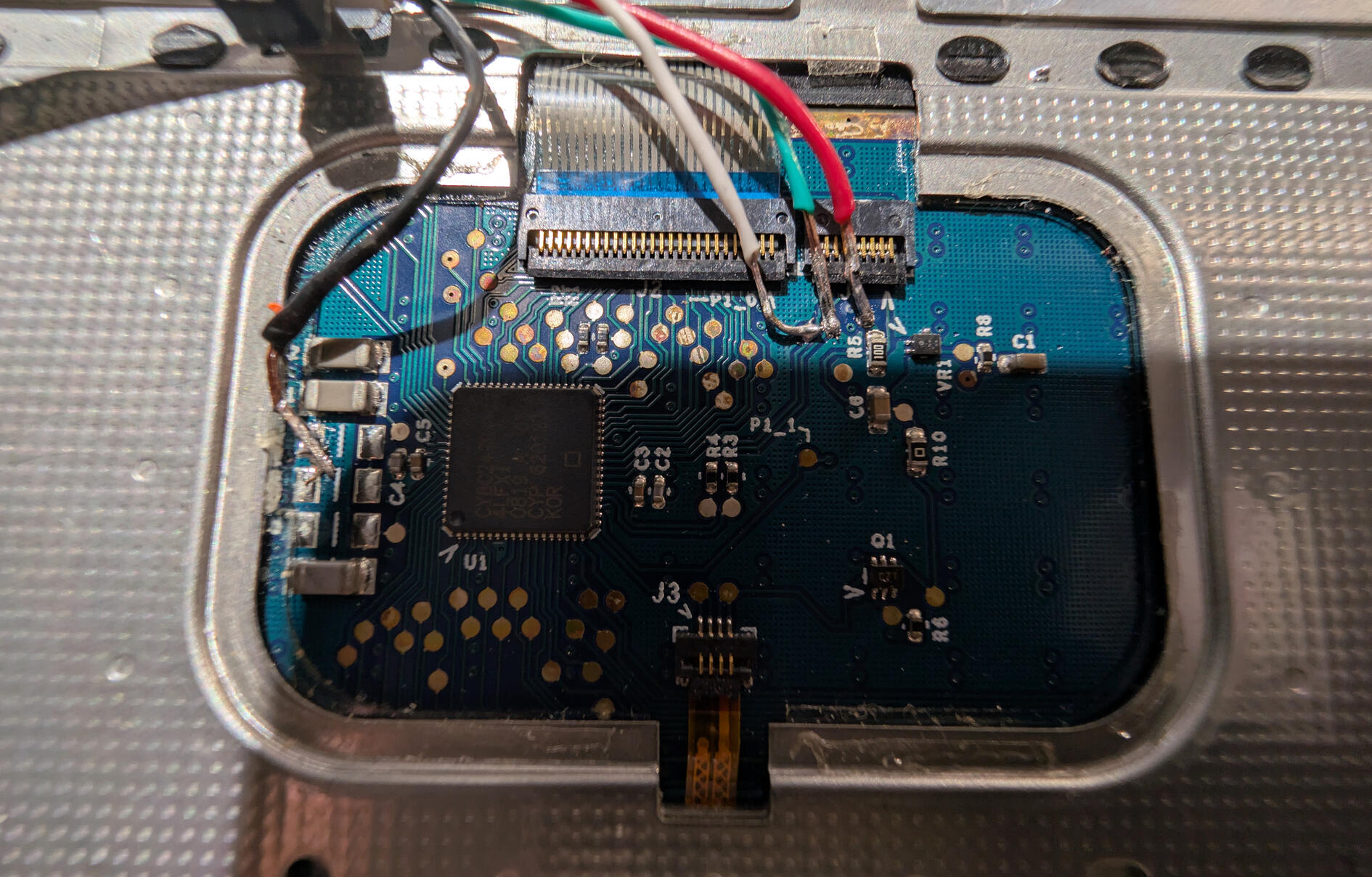
Long term, that may need to be redone. Really want less exposed wire in the final product, tin the tips of the wire first so they don't suck up the solder and trim to the appropriate length(only a bit bigger than the size of the pads at most). This is a good example on tinning: https://www.youtube.com/watch?v=pRPF4wpXX9Q And if you need to expose a lot of wire then just use some heatshrink so it's not exposed once you're done.
In a perfect world, you'd want to remove all the existing solder and then re-solder everything. But de-soldering can be its own skill and isn't always strictly necessary. Just something more to work toward.
I think they speak to the importance of good design in the objects we use the most. Function but also form.
When everything is mass-produced, everything is ill-fitting. Normalize tailoring.
This part is simply amazing, the "nothing is impossible" drive!
Personally I thought the later plastic macbook with the rounded edges was a much nicer design. Or the earliest white iBooks, which had a transparent case with white paint inside so they had this really cool glow. Unfortunately that caused shadows on the tiniest scratch which acted like a magnifying glass, so you really had to keep it pristine. But in those days a macbook was super expensive so I always kept mine in sleeves.
By the way I love what you've done with the EL film powering the back apple light. That looks amazing. It should always have been implemented like this, so you can drive it separately.
I still have the shell of a CF-17 that's just begging for new guts... but I'd have to aim for something quite a bit lower-power as it's a sealed chassis with no provision for air cooling. Perhaps a CM4-based build...
Aaah! Why must other people be so productive! It gives me too many projects!
Hackintosh typically refers to running not-MacOS on apple hardware? Imo this project of removing almost all of the inner guts and using effectively a Frankenstein'd collection of things to reconstitute it into laptop needs a different word.
If it were me I would choose
Franekntosh
I don't think there's a word for running other OSs on Apple hardware, because it's officially supported.
During the time of x86 macos this was AMD or Intel PCs
I previously had a pretty good experience with it before moving to Linux.
I was initially so happy to see a Linux build that looked so much like macOS, but then saw windows 11 pro on the about, and died inside..
I guess that’s why it has 64 gb of ram, so that there’s 10 left for applications after windows is done lol
Dual-booting into a hackintosh was a breeze. I eventually salvaged an old T60 and it was a similar case, enough crossover in components that it wasn't any trouble running macOS.
This was in an era where you wanted Apple software even on non-Apple hardware. Today, it's the opposite.