This reminds me of a story from a past job. I have to get it out of my system.
There was this bearded sysadmin guy who was very proud of his "15 years of experience", and was quick to scold us new employees for every little thing he could.
He used vim, and every now and then would say that it's a good editor, but kinda "unstable". Crashed a lot, he said.
You probably know where this is going.
One day, one of us sat next to him and discovered many suspended vim jobs in his shell (this was the kind of guy that doesn't power off his computer).
He was fat-fingering C-z all the time, and has never heard of job control - bg, fg, etc.
15 years of experience.
I know you might prefer to run a shell on emacs (or vim) but something only the full terminal can do what you need it to do
Also, with LLMs driving so much of current development it potentially makes Emacs even more competitive relative to modern IDEs. Development can be driven primarily by an agent like Claude Code from the command line, then navigating and tweaking the code, handling Git commits, etc with Emacs.
I imagine an LLM would be very good at writing Elisp to leverage EMacs’ strong core functionality to make Emacs work exactly how you want. This author managed to do it by hand, but I imagine someone starting now with an LLM could get there much faster.
Yes, they are pretty good. I have set up GPTel (an excellent Emacs package for interacting with LLMs) with some tools allowing it to run Elisp, inspect files (Elisp functions know what file they were defined in, so it's easy to find stuff) and read Emacs documentation. LLMs use this to good effect, and iterate on my config very nicely.
Emacs is highly customisable. There's not really a hard difference between "configuration" and "extension". Whereas with e.g. VSCode, very few people would write their own extensions. -- So it's a good point that with LLMs, the barrier to customise Emacs to exactly how you want it is even lower.
I'd also argue that since practically everything in Emacs is text (as opposed to a rich GUI interface), Emacs itself ought to make for a nice interface to LLM functionality.
Seeing it stay at #1 for a few hours while my blog server struggled with the requests was quite a joy :)
PS: Also, thanks to everyone who commented on it. While I can't reply to all of you, I'm doing my best to read everything. I'm glad to hear that the project resonates with so many people, whether philosophically, aesthetically, or as something partially useful.
This resonates with me so hard. I'm not a "no external packages" purist, but there are a number of pieces of functionality that I wrote for myself because there wasn't anything quite like what I wanted.
One example is a function to expand the region (selection) to any arbitrary set of pairing delimiters that I define in a defvar (parens, quotes, brackets, or I can can supply a custom left/right regex for matching). Then, when I execute the function, it waits for a second keypress, which is the trigger key I've defined for that matching pair, and it will expand the region to the left and the right until it meets the applicable delimiter.
Repeating the same key presses results in selecting the left and right delimiters themselves, and another repeat will extend to the next set of matching delimiters, and so on.
Even though I use a treesitter-based expand-region plug-in, my custom function is still invaluable for when I want to jump past a series of valid treesitter object expansions, or when certain text objects are just not defined in treesitter.
Some of the helpful custom expansions I have defined are:
"w" to select what Vim considers a lowercase-w word
Space to select what Vim considers an uppercase-W word
"$" to select ${...}-style expressions
"/" to select everything between forward slashes
"*" to select between asterisks (useful when editing markdown)
It's really an invaluable function for me, personally, but I always talk myself out of trying to open-source it because it has some gotchas and limitations, and I just don't want to be on the hook for trying to make everyone who uses it happy.
?!? Wtf does this mean and how did vi come up
There's also no reason why you have to literally write everything yourself either. You can find open source licensed packages, read them to understand them, and then copy them into your config. Doing everything from scratch is a waste of time unless you enjoy the process (in which case go nuts).
It's roughly equivalent to trying to discover all of our scientific knowledge yourself from scratch vs taking "for granted" the knowledge discovered by your forebears. There is no shame or disadvantage in doing so.
Also, a critical objection:
> Writing your own packages is the best way to learn Elisp
Absolutely not. Reading a language is crucial. If all you do is write, you will pigeonhole into weird practices and generally fail to improve. Only by reading stuff written by others can you learn, as you're exposed to what other people do right and wrong, both of which will be different from you.
Of course, writing your own packages is also necessary, but not sufficient alone.
I don't think the post implied that this package writing activity was a write-only activity where reading and learning is strictly forbidden.
> You can find open source licensed packages, read them to understand them, and then copy them into your config. Doing everything from scratch is a waste of time unless you enjoy the process (in which case go nuts).
The post clearly indicates the relatively large set of open source packages they looked at and understood before doing their own packages. The author graciously acknowledges them and their influence on the work:
"Emacs Solo doesn't install external packages, it is deeply influenced by them. diff-hl, ace-window, olivetti, doom-modeline, exec-path-from-shell, eldoc-box, rainbow-delimiters, sudo-edit, and many others showed me what was possible and set the bar for what a good Emacs experience looks like. Where specific credit is due, it's noted in the source code itself."
I think of it more like building stuff out of Lego without following any instructions.
It seems pretty clear that the "why" is "because it's there"
> It's roughly equivalent to trying to discover all of our scientific knowledge yourself from scratch vs taking "for granted" the knowledge discovered by your forebears.
The author do have another config with all the bells and whistles. But Emacs does come with a lot of packages and tweaking them isn't that much work compared to building a full suite like Helm, especially with the awesome documentation system. Getting a v0.x of anything can be a matter of minutes. And then you wake up one day and you've built a whole OS for your workflows.
I’m a GUI guy though. As soon as I try delving in, I abort when I see things like “just type c-C dingle bob to do x thing.” I’m happy these people found something that works with their brains. I just want a GUI that works like what they use.
I recently saw a Zed fork stripped of AI stuff but there’s no binaries yet (you gotta compile and get an Apple dev account and I don’t care enough). Zed and Sublime Text are the closest to my stylistic sensibilities but I’m always on the lookout for something better.
If you’re one of these EMacs freaks who also love GUIs, sign me up to your app!
You do have that somewhat with packages like which-key that will show you a menu of options every time you press a key. You then learn the keybinds that you use the most. You can also search for them by name and see the keybind like you do with VS Code etc..
Here's what doom-emacs looks like when I press space and then space-t:

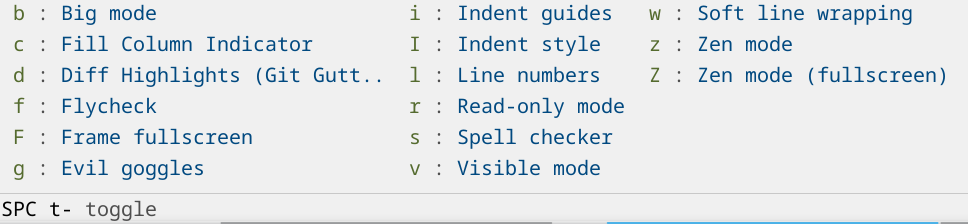
I don't think this is really possible. The thing that makes it special is that there are key binds for all the 100s of things you could want to do. So it becomes sort of like playing a instrument where you use your muscle memory instead of thinking specifically about the keys. If you make a bunch of menus and buttons to do the things it would be a mess and probably not very nice to use. Emacs actually has buttons and GUI controls for lots of the functionality, but it kind of sucks to use it that way.
These setups are impressive specifically because the creator has put in the time and effort to become an expert at using their editor. There is just no way to hand that over to someone else as-is without any investment from the recipient in skill development.
I used nothing but emacs for several years (well, xemacs, but close enough), because I was using an old Thinkpad, and long-term use of the trackpoint gave me RSI in my finger. Being able to use nothing but the keyboard was nice.
Eventually I went back to BBEdit and have remained there. You can make it mostly keyboard oriented if you want, but sometimes using the mouse is easier/faster, and I have a lot of reps inside of BBEdit. It just seems more like home to me. A nice balance between GUI and keyboard-focussed IMO.
When opening a freshly installed emacs, there should be a "Emacs Tutorial" link that can be clicked; also the keyboard shortcut `C-h t` (which is «Control + `h`, then `t`»).
There is a similar feature in `neovim`, when opened type `:Tutor` (which is «`:` to open the command prompt, with command `Tutor`»).
What was the Apple Dev account needed for? Previously I remember it was only needed for submitting apps to the App Store, not running Dev builds locally.
Sadly, "these days" is a low bar. The days of consistent platform-specific "Human Interface Guidelines" are over, it's all just a browser wrapped in a top-level window or something that simulates that, with most interaction patterns being a cargo cult of how it's remembered from the 90s. So "GUI" means that some unique overlays can be drawn without a fixed width character grid and that you might get the original file requester now and then.
Every thing except magit. I can’t think of a better way to use git, and it’s one of the main reasons I’ve never survived my adventures in editor wilds for very long.
Picking on this detail, what I've found works nicely is that when a new major Emacs version flows into my Debian, I also update all packages to their latest versions and then freeze those versions until the next major Emacs release. And those versions are locked in my emacs.d git repo, so I have a reproducible Emacs at home and work both. There's a little iteration to adapt to changes in Emacs and packages, but after that, it's stable and reliable for a year or two.
I wish we would someday be able to edit in xref too, wgrep having landed in Emacs 30 (especially since project.el grep goes to xref by default).
By the way, anyone more informed know about any work on getting a graphical browser to work on latest Emacs, now that webkit xwidgets is dead for Emacs 30+? (Have tried EAF; extremely buggy on Mac)
  ;; Makes any xref buffer "exportable" to a grep buffer with "E" so you can edit it with "e".
    (defun emacs-solo/xref-to-grep-compilation ()
      "Export the current Xref results to a grep-like buffer (Emacs 30+)."
      (interactive)
      (unless (derived-mode-p 'xref--xref-buffer-mode)
        (user-error "Not in an Xref buffer"))

      (let* ((items (and (boundp 'xref--fetcher)
                         (funcall xref--fetcher)))
             (buf-name "*xref→grep*")
             (grep-buf (get-buffer-create buf-name)))
        (unless items
          (user-error "No xref items found"))

        (with-current-buffer grep-buf
          (let ((inhibit-read-only t))
            (erase-buffer)
            (insert (format "-*- mode: grep; default-directory: %S -*-\n\n"
                            default-directory))
            (dolist (item items)
              (let* ((loc (xref-item-location item))
                     (file (xref-file-location-file loc))
                     (line (xref-file-location-line loc))
                     (summary (xref-item-summary item)))
                (insert (format "%s:%d:%s\n" file line summary)))))
          (grep-mode))
        (pop-to-buffer grep-buf)))
    (with-eval-after-load 'xref
      (define-key xref--xref-buffer-mode-map (kbd "E")
#'emacs-solo/xref-to-grep-compilation))I ended up cutting Emacs off from ELPA entirely, settled on a ~700-line init.el, and now use Emacs as a glorified Org-mode agenda keeper. It's been heavenly (especially with a dedicated monitor).
The one thing I'm still working out is syncing with calendars and email.
But too many problems. Even Grok, Gemini and Chatgpt were stunned.
Everything mostly worked out of the box.
No gptel, no ellama, just url-retrieve and some JSON parsing.
The no x no y just z is the new em dashes. And that will probably be true for about a week.
I've been using Emacs since one of professors/mentors converted me over a decade ago back when I was attending university. As the years have progressed, I have found myself reaching for Emacs less and less. I still maintain my config and use it fairly often. I cannot use Emacs at my employer either, so that doesn't help.
However, I have always wanted to do what the author has demonstrated. I would love to be liberated from the all package dependencies I currently have. I just do not have the time nor self-discipline to do something like this. Even if the functionality would be less than or equal parity with 3rd-party packages, I would prefer the Devil I know over the ones I don't.
In all seriousness very impressive and cool. Great information and post.
And no - vim isn't any better either. I always felt that in the emacs-versus-vim debate there were two losing sides.
Is there some reason Lisp is superior to any other general-purpose programming language for text editing? I'm skeptical because to my knowledge, Emacs is the only major text editor written in Lisp.
Still, the reason for choosing a language for whatever are always more social and path-dependent than technical (reason 1: initial developer of whatever really likes the language, reason 2: language is seen as hip within some crowd, reason 3 (later in the game): management feels language is safe). Technical reasons for choosing a language typically tend to be post-hoc rationalizations. (I mean, no sane person would choose Javascript for an editor based on technical reasons alone, yet here we are.)
[0] https://lem-project.github.io/ [1] https://www.lispworks.com/products/lispworks.html
You can think of Emacs as a kind of software Lisp machine with an emphasis on editing. Although that analogy only works well if you squint or if you don't know a lot about Lisp machines.
As someone who first learned Lisp through Emacs Lisp, I found it fun, well-documented, and powerful. Once you grok the basics of how the system is dynamically glued together, infinitely hackable, and self-documenting it's kind of mind-blowing.
purely for text editing? No. But that's not what distinguishes Emacs, it's famously very mediocre at it. The point of Emacs is to be a fully transparent, inspectable, dynamic and changeable environment. In spirit similar to Smalltalk systems like Pharo. And for that a Lisp is not the only choice but a very good one.
There's very few languages and environments that facilitate jumping into any place, making a change, compiling or evaluating a block of code or treating it as data and continuing seamlessly.
BTW emacs is written in C.
It's crazy to me how out of the box when you edit nginx file at /etc/nginx/sites-enabled/foo it creates another file foo~ there and nginx tries to load that too
When I tried to ask emacs reddit community they started attacking me for changing the default that only I need and fits everyone perfectly.
Still can't believe I'm the only one finding that default amazingly bad.
Using hidden files is a stronger convention, e.g. .foo.swp or .foo~.
But nginx's sites-enabled also doesn't filter those.
It's a very simple mechanism that assumes what you put in that directory is a website configuration.
Adding backup files here and there is considered spam, no matter how old it is.
It's the second thing I fix in either Vim or Emacs: Put backup files in a central location. (The first is proper indentation/spacing rules.)
Emacs does foo~ by default, not ~foo.
In either case, you're not really supposed to edit files in sites-enabled. That directory is expected to contain symlinks to files in sites-available. I'm not going to say with any certainty that one of the reasons for this indeed is that the pattern (which was used by apache as well - and perhaps other things before it) protects against accidentally reading backup files, but it's not impossible.
So there's definitely a case of holding it wrong if you end up with backup files in that directory.
Perhaps not a standard, but you yourself admit it's the default behavior.
Though I agree that the simple mechanism acts ... er,... simply, shouldn't it be at the very least aware of the default behavior of common editors?
That said, Nginx is also wrong and shouldn't do that.
Without this I had to be careful not to acciddentally commit stuff like ".#filename.txt".
First thing I do any time I install emacs.
Note that tramp will kvetch if you do this, but it still works fine.
(setq make-backup-files nil)
The fact it can do multi-hop edits is far too much power for us mere mortals.
- I already have tmux launched, if ssh drops – I can continue
- I don't have to match windows to ssh sessions -- just have them in my tmux
Tramp runs in your local Emacs and edits files remotely. It can also launch processes remotely and keep track of them.
You can change your own defaults quite easily!
Changing the default setup with emacs that has been shipping for > 30 years is tough.
Getting nginx to ignore a well established pattern by a well established editor seems equally sensible and perhaps more doable. Yes?
I disagree about "tough". Emacs has changed for the better in new releases quite drastically in the last years in my experience.
(but I still think this is on nginx more than emacs - unless they really mean foo~ and not .foo~ )
There are a ton of Emacs users, and it's doesn't make much sense to talk about them as a group like that, no more than if I were to say, "The list of things Windows users don't get..."
using the same directory drastically reduces the amount of assumptions about your system's permissions and your own installation (or lack thereof)
old school *nix editors typically do something like emacs and vi typically do, whereas old WinDOS/Mac single-user systems would have an installation file and a cache system-wide, and post NT and OS-X they have roughly the same but in a centralised user directory that is not system-wide, but is located as if it were (different evolution path)
But it's easy to disable or have them created somewhere else, which is more than you can say for most software lately.
[1]: https://gist.github.com/imiric/812398910c59cf00ab43d9172fe42...