Chuwi Minibook X
294 points by thcipriani 12 hours ago | 218 comments

lexicality 5 hours ago
I have one of these. It's an awful piece of shit and I love it.

I bought it because I was going on holiday and didn't want to take a real laptop both in case it got stolen and to dissuade me from using it. I ended up using it more than I would have a normal laptop because it's so small and easily carried.

My current use case is for my commute into the office, it easily fits on the microscopic train tables and doesn't add much weight to my bag. Highly recommended.

reply
bartread 3 hours ago
> It's an awful piece of shit and I love it.

I think, realistically, the issues the author describes - particularly with the keyboard and trackpad - would drive me up the wall for any kind of serious use.

But then, if you're travelling on holiday, do you really want serious use? I like your rationale of taking something that's bad enough that you won't want to use it but you have something if you really need it even if it didn't quite work out that way for you.

And, apart from theft, and depending on where I'm travelling, maybe a cheap device that I don't mind the authorities rifling through the storage of wouldn't be such a bad thing. Like I don't necessarily want $RANDOM_CUSTOMS_PERSON_IN_SOME_COUNTRY to have access to my bank statements, account details, or to get into my social media accounts, or whatever.

And it would be nice not to have to worry about any of that stuff if the machine did get stolen (sure, the drive on my main laptop is encrypted, but physical access is always a massive force multiplier when trying to gain access to a system or its contents).

reply
lexicality 15 minutes ago
> the issues the author describes - particularly with the keyboard and trackpad

I don't have the same problems with my model, possibly theirs is bad. I don't like that the keyboard is teeny and in the ANSI layout but I got used to it.

The trackpad isn't great but that's just yet another reason to avoid using the mouse and do everything with the keyboard.

That being said, I would never use it for fulltime use. I'm not even using it to type this message even though it's right next to me. I use it while travelling and it remains off at all other times.

reply
0xEF 36 minutes ago
I've been to a lot of countries (and thus through a lot of customs agents), the most they ever ask me to do, if anything at all, is turn the laptop on. I think the point is they want to make sure it's an actual laptop and not just a shell hiding something else. I've never had an agent touch my machine or show any interest in doing so, and I say that as someone who gets the extra searches often because I carry a lot of odd looking parts and small tools for work. Just pointing that out because I think the paranoia about what customs agents are allowed to do is a bit overblown unless you're suspected of smuggling or transporting something nefarious. They're not interested in what's on your laptop until you give them a reason to be.
reply
tauntz 11 minutes ago
I almost got denied boarding for a EU -> US flight ~13 years ago because the TSA agent at the gate noticed my 2011 MBP had 2 screws missing on the bottom panel (I've opened it up a bunch of times and lost some screws in the process). It didn't convince them that I turned it on and logged in etc. They still had doubts because, apparently, missing screws on a macbook was unheard of.. in the end, they held up the plane for ~10 mins due to waiting for a go/no-go decision via phone from some decision maker at the airline (as the final call was apparently theirs to make for some reason). Luckily, they were OK with missing screws and I was let on board.
reply
spankibalt 3 hours ago
> "I think, realistically, the issues the author describes - particularly with the keyboard and trackpad - would drive me up the wall for any kind of serious use."

Me too. But the tray table compatibility resonates. I had hoped someone would build a modern netbook as a detachable focused on productivity and light gaming (say, Steamdeck class), maintainability and (modular) expandability; a modern road warrior that's also a nice hobbyist machine that stands some abuse. Framework was/is positioned to put something out, but they decided to release the F-12 instead.

reply
manakov_dev 2 hours ago
I'm owner of this laptop - great device for home bed/couch use and traveling, which is easy to take and feels not risky in terms of potential damage or lost.

The screen isn't terrible. Frequency can be easily overclocked from 50 to 80Hz, making the manufacturer's decision quite odd. Good brightness, and after calibration, the colors are even somewhat normal.

In my case, the keyboard works reliably and isn't annoying, although it does take a little getting used to due to the smaller key size.

Only one thing that frustrates me - they cost-cutted on the battery controller. The OS only receives information about the battery voltage, without details on consumption/cycles/Ah. The consumption is hard-coded, which means the battery life estimate is never nearly accurate.

And yeah, terible touchpad but it's not that bad when you have touchscreen.

reply
Tade0 2 hours ago
> Frequency can be easily overclocked from 50 to 80Hz, making the manufacturer's decision quite odd.

99% it was done to extend battery life. It's probably in the order of 5%, but most likely not the only such decision.

reply
AbuAssar 4 minutes ago
Why did they use x86_64 in the article instead of AMD64?
reply
winter_blue 10 hours ago
Used laptops are such a good deal that you could something high quality in excellent condition for so little that I almost can't justify buying something like this. Like used Dell XPS laptops are ridiculously cheap and they're amazing for the used price.

Or really buy any laptop rated highly by Dave2D or other reviewers that's 4 to 5 years old.

reply
djfergus 9 hours ago
This laptop has a 10” screen, weighs 900 grams and runs an efficient N100 cpu.

Different category to a 15” 2kg cheap 5 year old dell.

reply
0xEF 2 hours ago
As someone who always favors the smaller laptops that don't require me to gear up an entire backpack just to do a bit of work on the go, I'd argue that the difference between a 10" and 13" screen is not nearly as much as it sounds. I've found the Dell XPS 13's to be an excellent choice for stowing in my service bag so I have a small-but-functional machine on a job site. That and the Dell XPS 13 just has better hardware all around, when stood up against the Chuwi.

15", sure, that's a bit big, but smaller models are available.

reply
mrheosuper 4 hours ago
Surface laptop go/surface go match perfectly. Same size screen, with decent build quality and no software quirk afaik.
reply
winrid 8 hours ago
A used x1 carbon is a better deal, faster, and weighs about the same with a bigger screen.
reply
derefr 8 hours ago
"Bigger screen" (i.e. being bigger on the length/width dimension) is a bad thing in this discussion. Some people want a programming/writing laptop that fits in a handbag, so that they don't have to decide to bring it, but can just leave it in their bag the way many people do with an iPad.
reply
Eji1700 4 hours ago
Amen. I have a GPD Pocket 4 as my go to because it, a second screen, a 40% keyboard, and the arc mouse all fit in my surprisingly small bag along with chargers, cords, and a bunch of non laptop related stuff (e reader, pens/notebooks, some small tools, a miyoo, etc).

It is, however, an expensive fucking device. $2300 maxed out these days (which I think is $800ish more than i paid. Hurray ram...) or $1400 min specs (which are still quite nice).

I'm glad to see other options at that size (Pocket 4 is 8.8", but my second screen is 10") but a literal quarter of the cost. 80% of what I do on the pocket could be done something like this Minibook, and I don't give a shit if the keyboard/mouse sucks because I've got my own anyways so long as I can tent it.

There will be those days where I might need to do some local heavy lifting and regret not having the Pocket, but I'm also happy to know if it dies on me tomorrow I've got options that aren't shell out another $1k for a tool mostly used for coding.

reply
bergie 7 hours ago
Absolutely. The 11" MacBook Air was the best laptop Apple ever made.
reply
hyperhello 6 hours ago
It was nice, but the screen bezel was huge. The latest 13 is about the same size and weight.
reply
petesergeant 5 hours ago
The _feel_ is very different though, even if the dimensions aren’t numerically. It was around half a cm at its thinnest, it was 250g lighter, and 23mm less deep.

I think at those sizes, what reads as small differences give an outsized experiential factor.

reply
rkomorn 6 hours ago
I loved mine but I'd be lying if I said it gave me three years of acceptable performance.

Sure, I can blame Chrome and JS, but ultimately, the core 2 duo and 8GB RAM did not keep up very long.

reply
kennywinker 5 hours ago
There was an 11” air with an i5/i7 - i splurged for 16gb of ram when i bought it in 2015 and it lasted me 10 years.

It still works, but a few specific apps started to really drag on it.

reply
JessieJanie 3 hours ago
It really pays longevity wise to get max ram!
reply
rkomorn 3 hours ago
Sure, but the 11" MBA I bought was max specs at the time it was released and the point is: it didn't last long.
reply
rkomorn 3 hours ago
I guess, but that kinda means I would've needed to improve my 11" MBA's longevity by buying another, more recent, 11" MBA though. :)
reply
stefanfisk 6 hours ago
I yearn for an updated version of the 12” MacBook with modern specs and keyboard. The 13” Air is way too large to be the smallest MacBook ;_;
reply
rahoulb 11 minutes ago
I really liked the 12" MacBook (although my all time favourite computer was the 12" PowerBook G4 - chunky by today's standards but I just loved it).

I saw a review of the MacBook Neo where the reviewer was yearning after the 12" - but suggested that Apple has made UI elements so big with such ridiculous spacing and border radius that it would be almost unusable at anything less than 13".

Which would not surprise me in the least - I struggle with my 16" MBP and this crappy UI "framework".

reply
djfergus 3 hours ago
Yes, same here. I can’t help but think they had an iPhone SOC planned for it (tiny motherboard, only one usb-c) but the hw/os team weren’t ready.
reply
petesergeant 5 hours ago
Part of that I think was that it was the first SSD laptop many people had had, so the fast boot up times were mind blowing. I had two, a work and a personal one, and I miss them terribly.
reply
pizza234 5 hours ago
Confirmed. Minibooks are amazing in cramped locations (for example, airplane seats), or just to always keep in the bag for support.

There's nothing in the market like them, which is a shame - I think a slightly better quality Minibook (Chuwis are plain crap) would be a very solid laptop.

reply
Eji1700 4 hours ago
I just responded above, but you might want to look at the GPD Pocket 4.

It is NOT cheap ($1300 min spec) but it's also quite a bit more powerful and with better ports (full size HDMI and Ethernet). It's not for everyone, but it blows my mind how little competition it has given how useful its been for me over the years.

reply
Zardoz84 5 hours ago
a Steam deck with a small form factor keyboard?
reply
ikurei 2 hours ago
I so wanted to love the Steam Deck, but it's a device with a 7 inch screen that occupies a massive volume on your bag. Unless you know you're going to play a fair ammount, it's not worth carrying around.

It's a fantastic console, but a mediocre general purpose computer.

reply
ndsipa_pomu 3 hours ago
A Steam Deck is a bit more lumpy than the Minibook. I find it a lot easier to put my Minibook into a rucksack as it's thin, so it can just slide between stuff. The Steam Deck is quite a lot bigger, though I often take both on holiday as they fill different needs.
reply
winrid 8 hours ago
I guess. 14" is about as small as I can use personally, that already hurts my hands
reply
bee_rider 6 hours ago
With laptop sized screens, I’m always tempted to try to have two windows side by side. 10 inch netbooks effectively dissuade that bit of folly.
reply
LoganDark 5 hours ago
A "programming" laptop should be powerful enough to run code, no?
reply
t-3 12 minutes ago
I was running gentoo on a 2011 Macbook Air for years with no problems. These computers are more than fast enough to compile and run code. They aren't going to by my first choice for reencoding video or running a build server, but for local development you really don't need a lot unless you're working on the type of stuff that really actually requires special or very powerful hardware.
reply
dspillett 4 hours ago
Depends what code you are programming. Unless you are doing significant number crunching, 3D work, or local GenAI, there is an awful lot that spec can do. If you are working on a multi-user system and it is slow processing your actions as a single tester on this, then you have a heck of a lot of optimising ahead unless you want your production users to hate you!

Maybe you'd save running a large test suite until back at base with the branch checked out on something beefier, but for on-the-go coding I expect this spec would do just fine for many. The reviewer's comments about the keyboard would be my concern, not the limits if what it can run.

reply
kennywinker 5 hours ago
If your code won’t run on this machine, you’re the problem not the machine (outside of niche processor heavy stuff like video editing and ai crap).
reply
LoganDark 4 hours ago
Compiling Rust is expensive, for instance.
reply
71bw 5 hours ago
Switch to a backpack or just leave the laptop in your car...?
reply
dspillett 4 hours ago
Or get what fits your preferred routine if available, instead of changing to match others?

Though my experience with this brand is mixed at best so I'd personally give this one a miss, especially given the reviewer's comments on the keyboard.

reply
dolmen 4 hours ago
So I would have to buy a car to carry a laptop?
reply
spariev 3 hours ago
Agreed here, with prices for used x1s its a no brainer. Although I get the appeal of super small and lightweight devices and even had eee pc way back, but started having insane headaches after working with small screens, so guess its just not for me.
reply
Forgeties79 4 hours ago
The whole point is people want to pay extra for superior portability. There is no x1 carbon with this weight and form factor.
reply
soulofmischief 5 hours ago
My x1 carbon gave me nothing but trouble from the beginning. I couldn't even move it too fast lest I risked it locking up. Additionally, my wrist strain got considerably better after ditching it for a comparably priced M2 that blows it out of the water in every conceivable category.
reply
cout 4 hours ago
Sounds like you got a lemon. I also have an X1 carbon, and it's been a great upgrade for me. My biggest complaint is the eraser isn't as easy to use as my old toshiba. The eraser is important to me -- my hand gets numb using a trackpad.
reply
teleforce 3 hours ago
Previously my daily driver was a Thinkpad X1 Gen 6, it's a bit of troublesome.

Now it's X1 Gen 10, it has been largely trouble free.

Probably my next laptop will be the next Gen X1 with the new upgradeable LPCAMM2 RAM.

reply
kopirgan 10 hours ago
Absolutely. Any 2-3 gen old ThinkPad or Elitebook will outlast this and perform lot better.

I bought a tablet from this brand few years back. Screen edges were non responsive to touch within months.

reply
teravor 9 hours ago
my chuwi tablet had the eMMC suddenly die, it disappeared from the point of view of any software, kernel or uefi.

the brand is trash.

reply
antonkochubey 4 hours ago
If it was running Windows - no wonder, Windows is horrible at constantly writing … something to disk, and eMMC's are not high endurance devices. The flash itself had nothing to do with Chuwi and was most likely manufactured by either SanDisk or Kingston, it would have failed likewise in ASUS/Lenovo/whoever else made those crap Intel Atom + 4 GB RAM + 64 GB eMMC devices.
reply
teravor 3 hours ago
it was running linux and it died within the first few months of barely any use. i don't know what vendor the eMMC came from but they chose it.
reply
vachina 10 hours ago
What decent secondhand thing can you find at $350.

It is being thrown away in the first place for a reason.

reply
dnlzro 9 hours ago
I'm starting to see 2020 M1 MacBooks CA$350 on Facebook Marketplace. That's the device I'm using to type this out. It still lasts all day, and it's still the only computer I use.
reply
kauli 6 hours ago
My daily driver is a refurbished Lenovo Thinkpad T14 gen2 with R5/16/512 GB. 360e last year from a trusted retailer with a 1y warranty. I expect I'll be happy with it for some years, as my previous T450s is still running as a homelab.

I also just acquired a 2014 MacBook Air for two packs of coffee to use as a distraction free tty writerdeck and toy around with, as it's my first piece of Apple hardware.

reply
vachina 8 hours ago
The fact that it’s listed is meaningless. You need to ask the seller what’s wrong with it.
reply
dnlzro 7 hours ago
Why are you assuming there's something wrong with it? I'm not pointing to outliers that are only cheap because they're broken. The average market price for an M1 MacBook in my area is around $350.
reply
happymellon 6 hours ago
I'm seeing a lot of M1 Macbook Airs around £200-250, and Pros in the £300-350 range.

What's wrong with them? The M1 was popular and now people selling them are competing against a lot of other people selling them which suppresses the price. Like it or not, Macs are mainstream and therefore aren't going hold a "magic" high price.

reply
dghlsakjg 7 hours ago
I just searched my area. There were plenty listed as having no issues at that price point. eBay has similar deals. No reason to think that $350 isn’t the market price.
reply
pdhborges 5 hours ago
Could be boot locked to the original owner Apple account.
reply
thenthenthen 7 hours ago
I use a 16gb ram 1tb ssd 200USD m1 macbook air. Works great!
reply
rjsw 16 minutes ago
Lenovo T495s.
reply
dangus 9 hours ago
HP EliteBook 840 G10

13th Gen Intel, 14” screen, 16GB/512GB at about $350.

Lenovo and Dell both make similar business laptop models at around the same age and price point.

Businesses sell off perfectly functional laptops in bulk because they are on regular refresh cycles for employees, not because there’s anything wrong with them.

On the Mac side, MacBook Air M1.

reply
rcarmo 5 hours ago
I love mine: https://taoofmac.com/space/reviews/2025/05/15/2230 - I run Silverblue with niri and Noctalia Shell and it is very zippy, besides being able to drive huge external monitors.
reply
drum55 12 hours ago
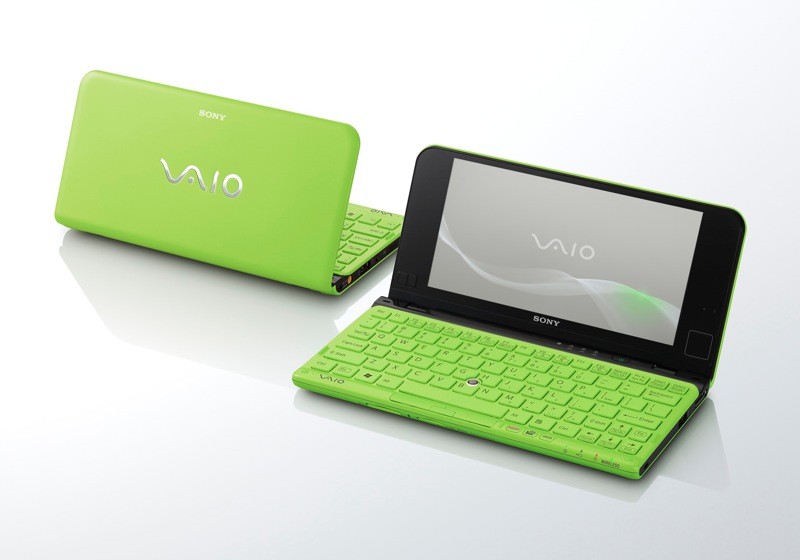
I miss my Sony Vaio P series which fitted in a similar sort of niche, the cellphone radio made it just by far the best laptop I've ever used. Modern laptops don't seem to have provision for a LTE/5G radio which always confuses me a bit, in this form factor it would be ideal. I'm surprised nobody has cloned this actually, with phone screens being the right aspect ratio it seems obvious.

https://www.zdnet.com/a/img/2014/10/03/9f923860-4b47-11e4-b6...
reply
nine_k 11 hours ago
Modern laptops either have an LTE modem integrated into the general wireless chip, or have a short m.2 slot for a modem card.

My T14 has even a dedicated slot for a SIM card.

reply
drum55 11 hours ago
I had a thinkpad at one point that had a slot, but because it wasn't optioned for it you had to patch the BIOS or it wouldn't boot with anything in the slot, it seemed so hostile as to be worthless.
reply
dlcarrier 6 hours ago
I'm on an X1 Yoga, and it has a SIM card slot and antennas, so it just requires an m.2 modem to get going.

At least with Lenovo laptops, that is very common. You con't need to order the laptop with a radio; it can be easily upgraded.

reply
Marsymars 11 hours ago
Probably a lot of people who care about this niche just get an iPad. (Which is what I've done - 5G iPad is great for travel - if I need something with a real OS, it waits until I'm home.)
reply
ai_fry_ur_brain 5 hours ago
Its also very useful to have an 5G connection for CGNAT for various reasons, for me its very useful for web scraping to avoid WAFs and rate limits. Currently you have to proxy through your phone, use a 5G base station (although these use static IPs often) or pay $6.00 a gb for mobile proxy bandwidth. Having a 5G connection on a laptop would be clutch, and is definately a priority of mine on my next laptop.
reply
Octoth0rpe 11 hours ago
we're probably only a year or two out from LTE/5g being an option on Apple laptops, and I can see a bunch of other manufacturers jumping in a year after that to claim parity.

(Note: My estimate on this is purely based on Apple implementing/expanding the use of their own cell modems, which also includes their wifi chip. It seems logical that they would quickly adopt the same chip for wifi in their laptops, thusly getting LTE/5g 'for free'. Definitely no insider knowledge on this)

reply
drum55 11 hours ago
There's actually a known prototype MacBook Pro from 2006 with a cellphone radio, and the release MacBook Pros from the time all have a weird looking area near the battery and RAM where the SIM slot was supposed to be, and some leftover parts for the goofy little extendable antenna on the screen. Hopefully they end up doing it.

https://www.macrumors.com/2011/08/14/photos-of-a-prototype-m...

reply
jauntywundrkind 11 hours ago
I got Vaio P many years after the fact and it was so neat. Alas, the PowerVR gpu Intel included on many of the chips there is quite quite problematic for anything but basic use. Although it just saw more work recently! https://www.phoronix.com/news/Intel-GMA500-Driver-In-2026

I think it was a year or two latter I got a Chuwi Lapbook 12.3, which was a great machine. Lovely 3:2 screen off the Surface Pro, again a pretty good Intel small-core set-up, decent ram, ok SSD, all so cheap. Great metal case. Lovely machine, at such a great price. https://www.notebookcheck.net/Chuwi-LapBook-12-3-Celeron-2K-...

reply
drum55 11 hours ago
I somehow managed to get it working in 2016 with a lot of hackery, I'd still have it as a usable device if the weird little pouch cells it had didn't die, repacking those batteries seemed like enough of a fire hazard I just didn't bother.
reply
DANmode 9 hours ago
Stuff like this that I’ve really enjoyed has gotten permanent AC or portable power.
reply
djfergus 9 hours ago
Wow. Have to respect someone spending time on the GMA500. It was terrible when new, I recall Ubuntu being barely able to render desktop without lag. Windows was better but still unpleasant. The vaio p’s odd screen aspect ratio was also a challenge.

I’d love to see someone retrofit a modern soc into the vaio p motherboard form factor. There were a few partial efforts on GitHub but seems like Sony’s miniaturisation skills remain undefeated.

reply
alexisread 3 hours ago
Not quite the same thing, but you can build a similar thing to run linux relatively easily, and the keyboards can be really good that way. You can swap out the SBC for one of your choice eg. https://www.lattepanda.com/lattepanda-iota (why don't AMD do small SBCs?) and cut a space on the left/right hand side for a trackpoint/optical trackpad (operate from the side)

https://github.com/penk/penkesu

reply
egorfine 38 minutes ago
I have a GPD Mini, the very first preproduction one.

Stock Ubuntu runs just fine since about 24.04 or 23.10 (do not remember). Keyboard is fine. Trackpoint instead of a cheap trackpad which is great. Touch screen.

And incredibly mind-bogglingly slow eMMC storage. Like, makes it impossible to use.

So as cute as it is, I haven't found any use for it for the last ~10 years that I own it. Maybe I have used it for emergency ssh from the mountain hike once or twice.

reply
hexagonwin 3 minutes ago
maybe try a linux distro like tinycore or porteus? it puts the rootfs in ram so things run insanely fast, and sync changes to disk before shutdown
reply
segphault 11 hours ago
I bought one of these last year, specifically looking for a modern take on the netbook form factor. I run PopOS on mine and absolutely love the machine. It’s a perfect travel laptop and it has largely replaced the iPad mini that I previously used as my travel companion. I sometimes use it with XReal glasses, which is great. I’ve found that a 35 watt phone charger is sufficient to charge it over USB C, so I don’t even need to carry a laptop-class charging brick.

I will note that I also had the screen rotation issue described in the post, but it was easy to solve at the desktop environment level in COSMIC. I didn’t bother dealing with it elsewhere because I honestly don’t mind if the grub menu is sideways.

reply
bee_rider 6 hours ago
The complaints about the keyboard sound more significant than the screen.
reply
iainmerrick 5 hours ago
Yes, I’d be wary of going anywhere near this for that reason alone. You can’t just say “the keyboard is terrible” but then that you still like it overall -- more detail needed!
reply
Dathuil 4 hours ago
I just unpacked my eee PC from college after a move. 8gb of RAM and can barely run a very stripped down version of windows 7. Just the thought of writing my final year project on that little machine again is giving me RSI.

I'll stick with my 13" MBP going forward. Netbooks served a purpose but I'm not sure they make much sense anymore

reply
uyzstvqs 5 minutes ago
> 8gb of RAM and can barely run a very stripped down version of windows 7

Not sure what you're doing, but Win7 itself uses 1 GB of RAM or less. Even just 2 GB of total system RAM was enough for basic usage, like document editing and single-tab web browsing.

reply
cout 4 hours ago
I feel the same way. I had a eee and later a Samsung netbook, but eventually ordinary laptops got light enough that a netbook is now just a laptop with a smaller screen. I'll always have a soft spot for them, but I doubt I'll use one again as a daily driver.
reply
ikurei 2 hours ago
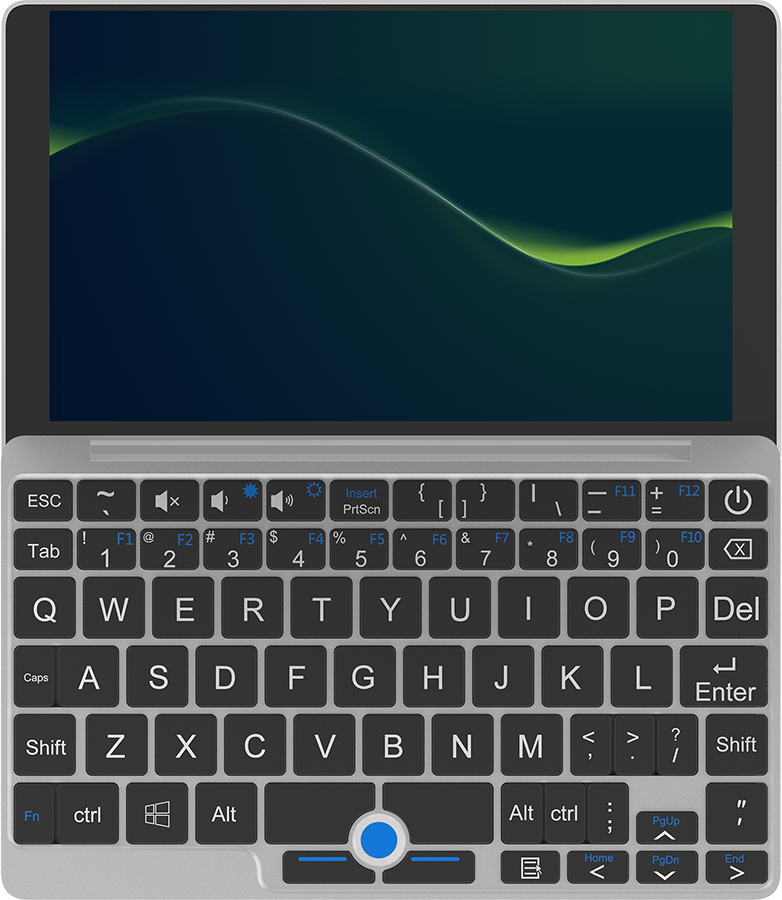
I have one, and I love it! I don't use it as much as I thought I would, but it brings joy everytime. If you have a need for an extremely portable, not very powerful device on your life, this might be it.

I agree with the complaint about the trackpad, but the keyboard has been just fine for me. Just a bit small, of course. I also find the screen perfectly acceptable for what I use this thing for: youtube, taking notes, writing emails, small bouts of coding and ssh'ing into servers.

My main complaint is related to battery management. May be it's becaused I'm used to Macbooks, but it drives me nuts to go pick the Minibook up and find that it has no power, because I haven't used it in a couple of days and I put it to sleep. I haven't measured, but the power use on sleep is noticeable, and I suspect the leakage while hibernating might be significant too.

I don't really like the laptop form factor. Laptops are the perfect solution for only one use case: using them on your lap. On a table, I'd rather have the computer be just a tablet, to add a bluetooth keyboard and mouse. At my desk, with bigger screens, I'd like the computer to disappear into a small puck or box, like a Mac Mini. With the Minibook, being so small, the form factor makes sense again. It's so portable, so easy to take with me to a coffee shop or on a trip, it's worth it.

A tablet with a keyboard might be a more practical solution, although generally more expensive, but I appreciate that my Minibook runs Linux so well, so I don't have to even think about Apple or Google telling me how to use my computer.
reply
alexrp 12 hours ago
The Minibook X is obviously targeted at the netbook form factor in the traditional sense, i.e. small and cheap. If you're like me and appreciate the netbook/UMPC form factors (for travel purposes in my case) but also need better specs to actually get any work done -- and you're willing to fork out a bit more to get that -- I would recommend looking at GPD's Pocket and MicroPC series. I own both a Pocket 4 and MicroPC 2 with Linux on them, and I'm quite satisfied. The only issue I've noticed is the same screen rotation quirk described here, for which the same workarounds apply.
reply
drum55 12 hours ago
The GDP devices are amazing except for the keyboard, which is some fever dream layout I've never been able to understand. https://img.website.xin/contents/sitefiles3601/18006016/imag...
reply
hug 11 hours ago
This is the primary reason the Minibook X won out in my searches: It's the only small device that has a keyboard layout that puts all of the keys in the right spots.

They're sometimes an odd size, but when I hit the wrong key due to a sizing constraint, I don't even have to think: Backspace, hit the right key with mildly adjusted positioning.

I've tried a few machines with different layouts, and that's never the case - and having to stop and look at the keyboard to find a key interrupts flow in the worst kind of way.

reply
vadansky 10 hours ago
I would love something that you can open and it expands/pops out a split keyboard like the Voyager (https://www.zsa.io/voyager)
reply
imran-iq 11 hours ago
Hey I also have the pocket 4, the screen rotation issue should be fixed soon (slash already fixed): https://github.com/systemd/systemd/issues/41036
reply
prmoustache 3 hours ago
I had the GPD pocket 2 and:

- the keyboards was terrible

- the battery didn't last more than 2h30 after only 6 months of use

- it ran super hot

reply
singpolyma3 11 hours ago
The specs on this thing look pretty great. Which part do you find insufficient?
reply
alexrp 4 hours ago
The CPU is just too underpowered; I'm sure it's fine for basic computery stuff, but building software and running medium/large test suites on it would be far too slow. Also not enough USB ports; I don't want to carry a USB hub with it.

Battery life on it is comparable to the MicroPC 2, but for the netbook form factor, it should really be compared to the Pocket 4. Similar story for the RAM, as well as the odd screen refresh rate.

Minor points: I do also appreciate the Ethernet ports on the GPD devices, and their approach to touchpads (buttons and placement in particular).

I guess my issues basically all boil down to the Minibook X not having enough functionality for the form factor when compared to GPD. That's mostly understandable for the price, but my point is just that if you're willing to fork over some more cash, you can get a whole lot more laptop in the same form factor (Pocket 4) or slightly better specs in a smaller form factor (MicroPC 2), and at least for me, that's the only way I could even have seriously considered these form factors for my work.

(Just to be clear, I have no particular brand loyalty to GPD; they're just the only player in town for high-end netbooks/UMPCs at the moment.)

reply
farfatched 2 minutes ago
> building software and running medium/large test suites on it would be far too slow

I'd figured remote development was the only viable workflow for these devices anyway?

reply
williadc 8 hours ago
I bought a Chuwi Lapbook[0] for my wife a few years ago. It was great at first, but got unusably slow running Windows within ~1.5 years. I got her a new laptop and put Linux on the Chuwi. It worked fine for checking email and light browsing. The touchpad had strange sensitivity and seemed to be hard-coded so that scroll worked the opposite of my preference. It was tolerable until the keys stopped responding to my typing. I found that if I pushed really hard in the center of the key, it would sometimes register, but required firmer pressing. Ctrl and Shift stopped working altogether after awhile. The problem crept up from the bottom-right side of the keyboard, and I eventually gave up on it at the end of last year.

[0]: https://techtablets.com/chuwi-lapbook-14-1/review/

reply
LeonM 2 hours ago
For on-the-go compute I am using a 2017 12-inch Macbook (AS1534). This is a lesser known model, it was simply called "12 inch MacBook" (not air or pro) [0].

It has the aluminium body, it is ridiculously thin (3,5mm thinnest point, 13mm thickest point, feet included), it weighs just 920 gram. It charges via USB-C. It has a very good 2304 × 1440 (16∶10) IPS "retina" screen.

I run mine with MacOS/Linux dual boot, I charge it using my phone charger. It keep it in my go-bag at all times. I never have to worry being without it.

What to love:

- Super small, yet very sturdy.

- Can be found for relatively cheap (I paid €300 for mine 2 years ago)

- Really nice screen.

- Keyboard size is really good, though travel is obviously minimal with such a thin laptop.

- Plenty of battery life (and new batteries still available at Mac store last time I asked)

- upgraded model has 1.4Ghz dual core i5, 16GB RAM and 512GB SSD, which is still more than enough for on-the-go use.

What not to love:

- Has only 1 I/O port (USB-C), which is also used for charging.

- No longer receives MacOS updates, if you find a 2017 production model you get updates up to MacOS 13.

- Linux support is not great. The WiFi/Bluetooth chip (BCM15700A2) is not fully supported in Linux, WiFi works but Bluetooth doesn't. Audio via headphone jack works, but speakers don't. There are some experimental patches to get BT and speakers somewhat working, but it's not great.

If you can find it, get a late production model (2017) with the 1.4Ghz CPU upgrade, it will have 16gb RAM instead of 8gb (earlier models) and receive MacOS updates up to MacOS 13.

[0] https://en.wikipedia.org/wiki/12-inch_MacBook

reply
nicbou 2 hours ago
I had this laptop and I loved it, but it was underpowered even for basic web development by 2023. It struggled to play YouTube videos in the background while I worked.

I really wish they brought back this format with the modern M processors. On the other hand, my M2 Macbook Air is around 300 grams heavier, but I don't need to carry a power adapter most of the time, and the device is much better in every conceivable way.

reply
flossly 11 minutes ago
For that price, I'd get an old, second hand, Thinkpad X1 carbon with a new battery.
reply
Rebelgecko 9 hours ago
I have an original Chuwi Minibook and would not recommend buying from them unless you're willing to treat the hardware as disposable. Their support is REALLY bad, warranty is useless (cheaper to buy replacement parts yourself on AliExpress) and the hardware has some baffling cost cutting decisions- I replaced the included jet turbine with a much quieter fan for a couple bucks, but most people won't want to solder their own harness to replicate this mod.
reply
avadodin 7 hours ago
They make great deals but if you can afford the 4x cost competition, I would recommend doing that instead.

I'd rather not have to underclock the RAM and be careful in which order I plug my USB hubs in order for the system to be stable even if I still end up with great performance.

reply
dnlzro 9 hours ago
I wish there were more laptops with a similar form factor. I was looking forward to the MacBook Neo before it was officially announced; I thought it was going to be more like an upgraded MacBook 12", but it ended up being more like a downgraded MacBook Air 13". Nobody likes small things anymore :(
reply
wqaatwt 6 hours ago
Isn’t the Neo almost identical to the 12”? It’s only ~1cm wider
reply
dnlzro 7 minutes ago
When you look at each dimension in isolation, the difference is fairly small. But the 12” is 60% of the volume and 75% of the weight of the Neo. It’s significantly more portable by these metrics.
reply
puzzlingcaptcha 3 hours ago
Starlite Mk IV is my favourite "netbook" successor. 0.9 kg, 11.6 1080p IPS display and Linux-first, with coreboot. Unfortunately it is a couple years old by now and you can feel that (Intel N5030 and 8GB of RAM). Sadly the company changed the form factor of Mk V to a detachable but if you can live with that it's also an option.
reply
gupti 5 hours ago
Glad to still see options for small portable laptops on the market, but nothing out there has drawn me away from the 2015 11" MacBook Air. Good keyboard and trackpad, and single core speed is comparable to the newer (albeit lower TDP) Minibook. It's enough for everyday use, and the fan allows for better sustained performance (though it's rarely needed).

My main pain point is RAM (even with zram), but considering the MacBook Neo was just launched with the same amount I don't think I'll need to stop using it unless it finally decides to kick the bucket. A lot of laptops like the Minibook are better on paper but the build quality isn't there.

reply
Forgeties79 4 hours ago
A 2011 mb air weighs almost half a pound more than this and is slightly larger. Also you are forced to run on 1) MacOS (which I like but is a limitation for many) and 2) since it’s unsupported will have many (especially modern) apps and such not work. I love my 2016 MBpro. Can still render edit and render 4K video, pulls solid work. But it’s limited. Can’t even download Final Cut on it anymore because Apple won’t let me pull the latest supported version of the app. Luckily resolve does.
reply
chromadon 4 hours ago
I feel like this is another “Framework 12 vs Neo” type of deal.

I can get a used MacBook Air M1 for £250 which beats the Minibook in every regard and it can run Linux.

reply
Tepix 3 hours ago
It's much bigger and heavier. I hope Apple will bring back a 11" notebook one day.
reply
bogantech 3 hours ago
Can it use an external display under Linux?
reply
czhu12 2 hours ago
I feel like what I really want is a phone that can do this. I've been trying to figure out a reasonable workflow with a tiny mouse, an expandable keyboard, and a phone with termius (SSH Client) + a remote devserver. It's so close, the only issue is the screen is a tad bit too small to get anything real done other than ad hoc vibe coding.
reply
d3Xt3r 59 minutes ago
[dead]
reply
asb 8 hours ago
Here's my notes on the device from last year with various setup tips https://muxup.com/2025q2/chuwi-minibook-x-n150

I can't say I agree with the author's assessment of the keyboard in this submission. I find it more pleasant to use than the other laptops I have access to.

reply
NathanielK 7 hours ago
Tragic that with a modern efficiency oriented SoC it still has such dissapointing battery life. Expected an improvement over X series thinkpads.

At least it can charge off a powerbank, but that's pretty standard now.

reply
montroser 9 hours ago
This is my daily driver laptop. It's pretty good for what it is. Runs Linux perfectly, not trying to be especially too fast, very nice pixel density, all metal case, sturdy build. Battery life is not the best. Beautifully compact.
reply
bArray 14 minutes ago
> Keyboard is terrible – it only registers keystrokes when you hit the exact center of each key.

I wish laptop manufacturers would pay more attention to this. I'm stuck using older laptops because modern laptops can't reliably pick up keystrokes.

reply
poisonborz 2 hours ago
Could someone please recommend a small, lightweight 2in1 style x86 laptop? Weight should be way under 1000g/2.2p. Best guess until now was some used Surface model, but those seem to be of really random quality and have overheating issues.
reply
0xEF 46 minutes ago
The Surface Book or whatever is going to be your best option because you want the 2-in-1 features. We had a few at my job before I switched to an XPS 13 since I never used it as a tablet and it was a weighty thing to have in my bag. Didn't hate using it like a laptop, though. Unfortunately, the price tag is also going to reflect the branding, so it won't be cheap. Same thing with a Lenovo Yoga or X13. That kind of functionality with good hardware is almost always going be pricy, I guess.

Can I ask why you want 2-in-1? I've personally never found the convert-to-tablet useful, and I have to imagine only visual artists might. I bought a nice case with a keyboard for my iPad Mini thinking I'd use it as a tiny laptop on the go, but in all honesty, I forgot the keyboard existed until I started typing this.

Not knocking your needs, just curious what kind of user those are for since I am obviously not the market

reply
nathell 4 hours ago
Similar vibes as my GPD Micro PC: https://blog.danieljanus.pl/i-love-my-gpd-micro-pc/
reply
edent 3 hours ago
Snap! The US only keyboard is a bit of a pain, and the trackpad sometimes glitches, but when travelling light this is excellent.

https://shkspr.mobi/blog/2026/05/gadget-review-chuwi-miniboo...

reply
Cockbrand 3 hours ago
Seems like this discussion creates a lot of interest in the Minibook X - researching the device on Google shows lower prices than on the actual pages behind the search results, so they must have become higher very recently.
reply
wzdd 6 hours ago
I have one of these and run Debian 13 on it. I love it. Having only two USB ports is annoying and I ended up buying a relatively expensive PD Thunderbolt hub, and there are some compromises that come with the territory (middling battery life, trackpad certainly isn't Macbook-quality). In general, though, it's great and it feels fun in way that I haven't felt about laptops in a long while.

As others have noted the company has done some pretty shady things with some of their other products, and I would not really expect a warranty, so this isn't really a recommendation. But my personal experience after ~six months of use has been good.

reply
whartung 11 hours ago
Dump the desktop. Switch your login shell to emacs and you have an overpowered WritersBook that’ll fit in a coat pocket.
reply
Shank 11 hours ago
I use a GPD Win Max 2 for this purpose (https://fluctlight.net/gpd_win_max_2) and while it has its quirks, the performance of a Ryzen APU is significantly better than the Chuwi Minibook X.

I think my desire for this kind of product is something lighter, but this set of notes on the Chuwi feels like the compromises GPD gives you but with less power.

reply
stuxnet79 10 hours ago
The GPD devices seem like they've cornered this whole niche in terms of ideal form factor but they are all ridiculously overpriced and that was before RAMpocalypse. I'm actually unsure how they will weather this storm because they are a small company and likely don't have any economies of scale to rely on.

I had no idea other vendors like Chuwi were providing netbook like devices. I will be doing more research tonight. Great post by OP!

reply
dnlzro 9 hours ago
It looks like the current iteration of the MiniBook will be discontinued soon; their official stores (on chuwi.com and AliExpress) are not selling them anymore. I've had my eye on this laptop for a while and still haven't bit the bullet, so I really hope it's not going away.
reply
matthewn 6 hours ago
I got one of these a couple of years ago, put Linux on it, and was pleased as punch: https://www.mahnamahna.net/blog/linux-chuwi-minibook-x/

It's actually the keyboard that surprises me the most: I think it's really good (and I consider myself a bit of a keyboard snob). I've never had any issue like the author describes, of having to strike keys just-so.

reply
onli 5 hours ago
With those brands it's quite possible they changed it later without listing that anywhere. Same for the Linux support, which they also specifically not provide officially (and there is a developer post somewhere that they dont ever test on Linux). Made me not buy this when I searched for a travel notebook last year.
reply
iainmerrick 5 hours ago
Very different reports of the keyboard in this thread. Are there different builds of this or something? Or is it just a very polarising keyboard?
reply
ndsipa_pomu 2 hours ago
I've got the N150 model, dual booting Ubuntu and Windows (very rarely use Windows to be honest though). I hadn't noticed any issues with the keyboard either, though the touchpad can do strange things at times, so I usually plug in a mouse. Also, I think the screen is really nice too.
reply
fancyfredbot 12 hours ago
I love small laptops but this thing would really benefit from a better processor. It's about 4x slower than the Snapdragon 8 elite, a 2 year old smartphone chip.

16GB ram is cool though.

reply
necrotic_comp 12 hours ago
I think the "net" does a lot of heavy lifting for a box like this - e.g. you do all the important work on a remote server, and only do basic maintenance work on the laptop itself.
reply
jauntywundrkind 11 hours ago
It'd be so lovely if these phones & systems could run Linux. Man. Such a pity.

PostmarketOS has a small handful of Snapdragon 870, 865 tablets (~5 year old, Cortex-A77). But it feels like it's by hook & by crook. Meanwhile it feels like bootloaders are just getting more and more locked down, making it less interesting whether mainline Linux support developers or not.

reply
cientifico 6 hours ago
Also got it last year.

I used to play with omarchy. It is good enough for a lot of use cases. For powerful work I just connect to remote session.

Perfect for planes in economy

reply
fg137 11 hours ago
What's the problem with 2K 50Hz screen? Too high resolution?

Lots of 15.6" Windows laptops come with 1080p screen which is painful to look at.

reply
nvme0n1p1 11 hours ago
50Hz is a weird refresh rate. Even back to the 80s (and before?) PCs have been 60Hz at a bare minimum.
reply
cheschire 11 hours ago
50Hz is what European power runs at, as opposed to North American 60Hz. This had some correlation to the analog film frame rates being 25 fps in Europe and nearly 30 fps in America, though I’m not entirely sure what the cause was.

Nowadays it’s probably a performance / battery saving “feature” attempt.

reply
Findecanor 10 hours ago
TV signals (PAL and NTSC) were 50 and 60 Hz so as to be in sync with the flickering of electric lamps.

When film is converted to 50 Hz TV, the film is sped up 24->25 fps and every frame shown twice. When converted to 60 Hz TV, there is "2:3 pulldown": every even frame is shown twice, every odd thrice. (Actually, both PAL and NTSC have interlaced video modes, with only every other line updated each frame, so as to conserve bandwidth.)

BTW, when 60 Hz computer monitors were introduced in Europe and used in office spaces with fluorescent lights with passive ballasts that flickered at 50 Hz, some sensitive users suffered headaches from using the computer screen for too long. These days, both fluorescent lights and LCD backlights tend to flicker at much higher frequencies that it isn't much of a problem.

reply
jdub 11 hours ago
Nah, not film rates [1], video: NTSC is 30fps and PAL is 25fps because the cathode ray tube scan rate was built around AC power cycles. When low fps truly Hz. Sorry.

[1] generally 24fps because that is culturally what film looks like and people get very weird whenever anyone tries to fuck with it

reply
toast0 10 hours ago
I'll allow your joke, but NTSC is 60 fields per second, and PAL is 50. Certainly a large portion of content came from film and in PALworld would be shown as even and odd halves of a frame, or in NTSCland as 3 halves of a frame, then two halves...

But actually interlaced content exists too. Each field is independent, there's no frames to speak of.

Early video game systems based on NTSC/PAL ran at 60 fps or 50 fps, but ran off-spec signals to always hit the same half of the display lines (odd or even). 4th gen systems (genesis/mega drive and snes/sfc) had a few games that used interlaced output; later systems had many, running PAL@60Hz became a common option too.

reply
brk 10 hours ago
Not only was it built around AC, the technology at the time only allowed for roughly 1/2 the AC cycles rate. People think there was some great reasoning behind 30fps. It was just what was available, essentially.
reply
fragmede 9 hours ago
The original black and white NTSC was 30/60 Hz but was changed to 29.97 fps in order to be backwards compatible with black and white TVs.
reply
tom_ 10 hours ago
Standard CRT TV refresh rate in the UK. Pretty much all home computers here produced 50 Hz output, the goal being that they could be connected to a TV, until the PC started to eat that sector in the early 1990s. Games consoles supported 50 Hz (same rationale) until at least PS2/Xbox.
reply
singpolyma3 11 hours ago
Certainly seems too high for that screen size. But probably not fatal
reply
voidUpdate 4 hours ago
> "Netbooks are dead"

Not if you buy an eeepc off ebay and put a light linux on it, then they're as good as always. Love me a good netbook

reply
jagermo 4 hours ago
I loved the Netbook class; the MSI Wind was such a fun device that you could take everywhere. Decent battery, good screen and fantastic keyboard.
reply
oybng 9 hours ago
What I wouldn't give for this machine with a thinkpad keyboard
reply
hk1337 11 hours ago
It looks nice but I feel like a bear riding a tiny unicycle using these kinds of computers.
reply
DR_MING 4 hours ago
This is how I feel about Emacs.

The appeal isn't necessarily the end result. It's the process of tinkering, learning, and gradually making the tool your own.

reply
jdub 11 hours ago
Alan Cox had a pre-netbook netbook smaller than a VHS tape at linux.conf.au 2001, and milled about chatting with colleagues and fanboys while his kernel builds scrolled by in the background. Everyone would gawk at the strange little machine.

It was Japanese, naturally.

At linux.conf.au 2007 we chose a smaller conference bag, designed to carry your electrical accessories and nick-knacks... it turned out to be the perfect size for the new EeePC (and later the MacBook Air 11").

reply
paradox460 11 hours ago
HP used to have extremely small laptops in the early 90s, specifically the omnibook 300

https://en.wikipedia.org/wiki/HP_OmniBook

reply
zokier 4 hours ago
The HP LX series (95LX, 100LX, 200LX) is one of my favorites. It also fits the description "smaller than VHS casette"

https://en.wikipedia.org/wiki/HP_95LX

https://en.wikipedia.org/wiki/HP_200LX

reply
0gs 8 hours ago
don't forget the Jornadas. i guess those were PocketPC-powered but i def bought one circa 2005 for like $90 and i would do it again right now
reply
supz 9 hours ago
Why must he say Hackers is a classic film. It was a pivotal part of my life. I'm not even that old
reply
someotherperson 9 hours ago
The time difference between today and Hackers is the same as when the film was released and the year 1964. That's the year films like Dr. Strangelove, Goldfinger and A Fistful of Dollars was released.

You (we) are old :)

reply
Wowfunhappy 11 hours ago
> Keyboard is terrible – it only registers keystrokes when you hit the exact center of each key.

I'm a big believer in cheap, small, low-power laptops. For simple tasks, you don't need that much compute.†

But you can't skimp on the keyboard! Especially because, one of the big advantages of a low-power laptop should be for writing!

------

† Okay, Electron exists... you shouldn't need all that compute.

reply
tinmith 9 hours ago
I have a Chuwi Minibook X and the keyboard is amazing. Its the best smallest keyboard available anywhere, I can type on it just as easily as my other larger laptops. I think there must have been something wrong with the reviewer's hardware, mine works great.
reply
hug 12 hours ago
I have this laptop, and it is amongst the best laptops I have ever owned, despite being awful in many ways. It has almost completely replaced my use of my M4 Macbook Pro, simply because I always have it with me. That, and it can run Linux.

I don't share the complaints of the OP about the keyboard or the screen, though. The keyboard is fine, I can hit about 110WPM on it, slower than my regular pace, but enough that there's no dramas. The layout is great: Occasionally there's keys that are too small (looking at you, apostrophe) but everything is at least in the right spot, which is way more important.

The 2K display at 10" is high enough DPI that everything is totally crisp, and you can unlock ~95Hz (bad for video, good for everything else) with a bit of a tweak. You can also smash a byte into the EC at the correct offset and access the full unrestricted BIOS -- mostly to crank the RAM up to 4800MT/s.

I'm running vanilla Arch with Niri and Noctalia, and it's a dream. It's my primary dev machine, used in combination with a remote server with a tonne more grunt. If it broke tomorrow, I'd buy another - and I wouldn't do that with my macbook.

To the OP:

* Accelerometer support, EC-byte-bashing to get BIOS unlock: https://github.com/greymouser/minibook-x-tools

* 95Hz EDID fix: https://github.com/sonnyp/linux-minibook-x/issues/7#issuecom...

reply
tinmith 9 hours ago
I agree. The keyboard is fantastic, it is the best smallest keyboard I've ever used. Debian 13 works out of the box and there are no screen rotation issues.
reply
barbs 11 hours ago
Did you also have the screen rotation issue? Curious to know what's causing that.
reply
drum55 11 hours ago
The cause is just that the panel is mounted rotated on the device. It's supposed to be used in a tablet where the top is the short end and the side is the long end, opposite to a laptop.
reply
Rebelgecko 9 hours ago
Somewhat common with Chuwi and GPD's netbook type devices. IIRC it's because they repurpose tablet screens
reply
hug 11 hours ago
Yes, I did, and the reason is super straightforward: It's a hardware portrait panel, mounted sideways.

Getting from zero to a fully working OS was a mild journey, but I'd do it again.

reply
thelastgallon 8 hours ago
reply
echoangle 9 hours ago
Would the rotated panel mean that any screen tearing is vertical or is the screen update order also changed when the screen rotation is changed in the settings?
reply
dxxvi 10 hours ago
That $350 price tag is good for that configuration. Not sure how fast the USB-c ports are. It should have an HDMI 2.0/2.1 port. Mini PC's with the N150 CPU support 2 4k@60Hz monitors.
reply
meyum33 9 hours ago
I have a Chuwi Lark Box from a few years ago. The volume less than my fist, it's great for doing occasional Windows stuff.
reply
nosrepa 10 hours ago
I'll take my gpd pocket 4 over this for sure, though funnily enough it has essentially the same screen problem.
reply
theodric 2 hours ago
> 16 GB RAM – LPDDR5-6400 – soldered [crying cat emoji]

No need to cry:

1. Per ark[1], "Max Memory Size (dependent on memory type) 16 GB" - you wouldn't be doing much with modular RAM, anyway

2. Swapping BGA package RAM actually isn't THAT hard. If you invest a few hundred monetary units now in a hot air station, some flux, a few relevant stencils, some solder paste and/or appropriately sized balls, fine tweezers, and (for extra credit) a €£$60 AliExpress LCD microscope, you never have to cry again when the laptop you prefer has soldered RAM, a soldered M.2 1216 SMT Wi-Fi module, a flaky USB-C charge port (ThinkPad plague), etc. Guess how many Raspberries Pi 4 I've upgraded to 8GB RAM!

[1] https://www.intel.com/content/www/us/en/products/sku/241636/...

reply
wolvoleo 10 hours ago
> Keyboard is terrible – it only registers keystrokes when you hit the exact center of each key.

So, unusable for blind typing.

920g for a 10" is also crazy much. LG make 14" laptops under a kg.

I want something like the Sony Z4 tablet. About 600g with keyboard dock. Thin, waterproof (not the keyboard), days of standby, 4G supported, the keyboard was excellent.

If it would be possible to run a current version of Android on it, it would be perfect.

reply
a1o 11 hours ago
I love netbooks and I am curious to get one of these at some point - I can’t justify one right now.

I do have my ASUS EEEPC 701 4G Surf still working. I think it is 18 years old at this point? It is rocking Antix, in its 3.6 GB hard drive. It broke the S key in the keyboard last night and I ordered a replacement.

I use it as writer deck and to ssh to my server and raspberry pi from the sofa.

It is built in a very resistant way? Survived my kid so far.

reply
einpoklum 3 hours ago
It's not particularly cheap. There are cheaper 14.1" laptops which are probably better-built, with a more responsive keyboard etc. Not sure why the poster chose this one.
reply
kylec 11 hours ago
Netbooks aren't dead, they're just called Chromebooks now
reply
alterom 11 hours ago
Chromebooks aren't netbooks.

They're Android tablets with non-removable keyboards.

The idea of a netbook was very small, cheap, portable, full-featured computer that you could use like a normal computer.

All the ports, your desktop OS, and so on.

Chromebooks ain't it, even if they compete in the market segment that made netbooks a success.

reply
Groxx 10 hours ago
So replace the OS: https://docs.mrchromebox.tech/

I've done that with mine. Worked great, and now I get around 30 hours of battery life with a lean linux distro, as long as I'm only like reading websites or writing on it.

reply
alterom 10 hours ago
>So replace the OS: https://docs.mrchromebox.tech/

How's the Windows support with this flow?

reply
Groxx 10 hours ago
Depends on the device (for both Linux and Windows): https://docs.mrchromebox.tech/docs/faq.html#will-my-device-r...

For a list of devices: https://docs.chrultrabook.com/docs/devices.html

reply
fragmede 10 hours ago
Which windows program are you looking for, specifically?
reply
alterom 8 hours ago
>Which windows program are you looking for, specifically?

All of them, specifically.

I don't want to think about which windows program can or can't run with Wine.

This includes:

* Microsoft software, from MSTeams to Windows itself

* Audio production software (DAWs and VST plug-ins)

* Games

* Device-specific software (like drivers/software for portable thermal printers)

* CAD (nTop, only supports Windows, for example, and don't tell me I don't need it; same for many Autodesk products. NX and Rhino don't have Linux support)

The last one is the most fun, as I'm a CAD developer who worked on nTop in particular.

reply
Dylan16807 8 hours ago
I'm surprised you want to run real CAD software on a netbook. I think your use case is pretty unusual.

Also drivers are often better on Linux.

reply
Groxx 8 hours ago
tbh I suspect it would be just fine. even the really cheap ones tend to have at least a few gigabytes of RAM.
reply
alterom 4 hours ago
>I'm surprised you want to run real CAD software on a netbook. I think your use case is pretty unusual.

CAD has been around since before IBM PC came out. It's not necessarily a demanding piece of software.

Still, scratch CAD. My favorite VST synths are Windows-based.

And I don't want to lug around extra kilograms just to make some noise.

reply
dijit 4 hours ago
I think you missed the point of a netbook.

Aside from Microsoft Office, the rest is workstation stuff, and Microsoft Office is pushing "web first" (at least if their pricing is to be believed, the lowest O365 subscriptions do not offer access to the native apps).

reply
alterom 4 hours ago
>I think you missed the point of a netbook.

I think you missed the point of the question.

> the rest is workstation stuff

Yes, I want to be able to run workstation stuff on the small computer I carry everywhere, so that I don't have to carry my workstation everywhere.

reply
dijit 3 hours ago
get a workstation laptop then?

I feel like I’m taking crazy pills.

Your e-bike can’t tow a carriage either, that’s not strange.

reply
fragmede 6 hours ago
We'll have to see how the AI softwarepocalypse goes. If I only need 10% of the features of Photoshop, I really don't need to be spending money on the full software suite.

How's nTop Linux support coming along?

reply
dtkav 10 hours ago
I have a matte black Pixelbook Go running PopOS and i love it.

The hardware feels great to hold (though the touchpad is still meh). I covered the Google logos with a glossy black vinyl Obsidian sticker.

https://notes.danielgk.com/Hardware/Travel+Laptop

reply
singpolyma3 11 hours ago
I run my desktop OS on my Chromebook (boring Debian) and use it like a normal computer. All the ports (HDMI, usb) and so.
reply
queenkjuul 11 hours ago
Back when Chromebooks and Netbooks were contemporaries, yours was a much harder proposition. I had an awful time getting Linux on my first gen Chromebook
reply
singpolyma3 10 hours ago
I've heard that on the new ones they've illegally made it not possible anymore, but haven't experienced direct evidence of that yet. For mine I had to remove a screw from the motherboard but it wasn't that difficult. Not much worse than jumper for boot order in ye olde days
reply
queenkjuul 4 hours ago
My suggestion? If you want a Chromebook to run Linux, look for surplus school laptops instead. My throwaround workshop laptop is an Asus that to me looks like it was clearly sold in an educational Chromebook format as well--partially ruggedized, partially waterproof, 12", N100, plastic blank where the camera should be, still only $120

Basically, if you're lucky, you can find Chromebook-class PCs with less restrictions. Admittedly I'm in a lucky locale for such things, but the one in question i bought from a normal retailer

reply
fragmede 10 hours ago
The new procedure is boot without the battery connected to enable writing to flash.
reply
singpolyma3 8 hours ago
If they're still allowing that it seems fine
reply
ajross 11 hours ago
That sounds like an opinion baked in 2013 and never revisited. A modern chromebook with Crostini can run basically any Linux desktop stack you want. Like, what exactly are the tasks you need from a "computer that you could use like a normal computer" that you aren't getting today?

As a data point: I'm 100% converted personally. A Chromebook is what goes into my backpack and the device I use for all my general day-to-day UI clickery, and it's a better fit for my needs than Windows (not nearly as bad as it used to be but still sort of a PITA to make work as a Linux-focused dev environment) or Linux (not nearly as much of a PITA for a connected consumer network device but still has the occasional wart trying to get something weird to run).

reply
yjftsjthsd-h 9 hours ago
Crostini is a mixed bag; e.g. IIRC something in their stack breaks ptrace. I prefer to wipe and install a normal Linux distro. But, when it works it works, and I do use one Chromebook with Crostini.
reply
ajross 6 hours ago
ptrace works fine on crostini. The guest kernel has Yama enabled, which restricts it to root for boring security reasons. You can do your debugging at a root shell or turn the setting (yama/ptrace_scope) off via sysctl.
reply
alterom 10 hours ago
> A modern chromebook with Crostini can run basically any Linux desktop stack you want. Like, what exactly are the tasks you need from a "computer that you could use like a normal computer" that you aren't getting today?

Run Windows and Windows programs that I use.

> it's a better fit for my needs than Windows

Happy for you. The key here is your needs.

reply
ajross 8 hours ago
> The key here is your needs.

Well... yeah. Likewise your post is clearly about your needs, which are different. But that's not what you said, you said it "wasn't a computer" and you couldn't use it "like a normal computer". Which is obviously wrong. But I guess "normal computer" means "windows" to you, which (especially given the forum you posted on!) is a little surprising.

So what you wrote (but apparently not meant) seemed mistaken to me, thus the correction. But if you want windows then just buy windows. Your market is well served.

reply
alterom 8 hours ago
>But I guess "normal computer" means "windows" to you

Normal computer means a choice of OS to run on it without having to hack it to do that job.

Chromebooks aren't sold as general-purpose computing devices. They aren't "normal computers" in the same sense that cell phones aren't.

>which (especially given the forum you posted on!) is a little surprising.

I'm a CAD developer and user. I need Windows for my work.

I would hope that this forum includes people who are in touch with the real world.

reply
Dylan16807 8 hours ago
> Normal computer means a choice of OS to run on it without having to hack it to do that job.

That's too high a standard. When we consider MacOS along with Windows and Linux, there are basically no computers that let you freely choose between all three without hacks.

And even just considering Windows and Linux, a big chunk of the laptop market only supports Windows properly.

A laptop that runs any normal desktop OS is a normal computer.

reply
ajross 8 hours ago
You're losing me. Your first reply says "A computer that meets my needs must provide a choice of OSes", your second says "A computer that meets my needs must run one specific OS". To be blunt: your reasoning here is simply bunk and I don't understand it.

If you must use windows, then you must use windows and you don't have a choice. None of that has anything to do with the nonsense about Chromebooks not being "real computers" or whatever, that's just the rationalization you've decided on. Obviously they are real computers.

reply
fragmede 10 hours ago
> A modern chromebook with Crostini can run basically any Linux desktop stack you want.

Psh, Fuck that. Install actual Linux on it (I have Debian on mine) and don't deal with ChromeOS (if you don't want to).

reply
ajross 8 hours ago
That works great until you inevitably need to launch some streaming service that doesn't work on Linux Chrome or whatever. The needs of "general consumer junk we all deal with" are real. I spent decades on the "I don't actually need that stuff" hamster wheel too, and... yeah, it sucks and I'm too old for that.

A Chromebook is a first class consumer device backed by a Big Threatening Tech Giant that works on all sites everywhere because no one wants to piss off Google. And it's still Linux and runs great. I'll take it.

reply
fragmede 6 hours ago
> I'm too old for that.

I was too, and then AI came out, and now Codex just makes my Linux work how I want it, no needing to fiddle with .config/gconf whatever crap. I just tell it to fix my two finger scrolling on my trackpad, and it does it.

reply
orangebread 11 hours ago
The Crash Override boot up screen tho. HACK THE PLANET!
reply
ggm 8 hours ago
Zimablade chose the same 12v/2a power. It's in the original spec for usb-c pd negotiation.

Client side (device) sets the current draw. Weird take to not use the supplied psu.

reply
Elfener 4 hours ago
Pretty sure a power supply that just puts out 12V on USB-C without any negotiation is not in spec and should be illegal. As the article mentioned, it would damage anything that wasn't expecting 12V, like most things that take 5V USB power.
reply
AnonyMD 11 hours ago
Are the specifications listed in the article reliable? It's difficult to trust them, considering Chuwi has a history of misrepresenting CPU specifications.
reply
makeitdouble 11 hours ago
The author's benchmarks are listed in the article.
reply
AnonyMD 11 hours ago
Excuse me. I trust that.
reply
ipkstef 11 hours ago
where can i pick one up thats reputable?
reply
peddling-brink 9 hours ago
Apple. Or, what do you mean by one?
reply
mikeweiss 10 hours ago
Bummer that it has a fan
reply
mvkel 6 hours ago
Sounds like the netbooks of 2008: bad in every way, but hey, it's small?
reply
znpy 3 hours ago
i was seriously considering one of these about one year ago, but i was not 100% convinced and I ended up deciding to wait and see what else would came out (mostly driven by the rumors about a cheap macbook).

I ended up buying the macbook neo and frankly i think i made the right choice.

of course the macbook does not run gnu/linux (for better or for worse).

reply
LtWorf 4 hours ago
I have a couple of x86 tablets from Chuwi where I run Debian with plasma-mobile.

Battery life is crap, on the new one the webcams aren't supported by linux because they aren't v4l.

With plasma-mobile there is no need to mess with configuration about the orientation since it just flips the screen the way I'm holding it.

I contributed a couple of patches to KDE to improve the experience on touch devices but overall there is lots of applications that already work fine on a touchscreen. Alligator, kasts, a few kdegames, angelfish.

reply
jocelyner 7 hours ago
[dead]
reply
milgrum 11 hours ago
[dead]
reply
aumlhyuzdnv 6 hours ago
[dead]
reply
vee-kay 4 hours ago
[dead]
reply
justnoice 8 hours ago
[dead]
reply
LAC-Tech 6 hours ago
A notebook that weighs more than a kilo is simply not a good thing

– Linus Torvalds

If you are an adult, able-bodied human male, and you even notice a laptop being "heavy" becauase it's over 1000 grams, I am sorry but your health is fucked. I am not a strong man. But if you are so weak 200grams extra or whatever bothers you, sort your life out. Seriously. You will feel so much better.

reply
hellcow 6 hours ago
I travel with strict luggage limits (both size and weight) and hike all day. Removing weight absolutely helps.
reply
LtWorf 47 minutes ago
Depends how far you have to walk…
reply