KOReader
608 points by Cider9986 11 hours ago | 193 comments

gejose 7 hours ago
I really like that this exists, but I found the menus and UI to be rather non-intuitive. My main use case was to sync reading progress between my Kobo and my iPhone. I was able to do this using KOReader on the Kobo & the Readest app[1] on iPhone (also open source).

Ultimately I decided to get rid of KOReader because it felt a bit laggy. The gestures (eg: swiping up on the left side to increase frontlight brightness) didn't work well either.

I eneded up writing my own software to sync progress from Kobo to a KOReader Sync server[2] which my Readest app also connects to (love that unlike the Kindle, the Kobo is quite an open system). You can even set it up so you can SSH into it[3].

[1] https://github.com/readest/readest [2] https://github.com/koreader/koreader-sync-server [3] https://www.mobileread.com/forums/showthread.php?t=254214

reply
Lalabadie 6 hours ago
I really appreciate that KOReader is an option. On my older Kindle (first-gen Paperwhite), the default reading experience had declined until page turns take several seconds. Firmware update and factory reset wouldn't fix it. Using the default reader just wasn't a viable scenario.

I jailbroke it, launched KOReader, and it's like I have a new e-reader. The amount of customizability gets kind of in the way, but once it's set up I don't really think about it from one month to the next. I also didn't feel the need to upgrade my original install either.

reply
Thews 2 hours ago
Amazon bricked the first gen paperwhite, so I went on a similar journey. I started out making a single rust app on it, then went down the rabbit hole of trying to replace the shell/launcher. https://github.com/justinledwards/ferrink-home-assistant and "ferrink" is the launcher. It is pretty snappy on the paperwhite for what it is.
reply
WhyNotHugo 29 minutes ago
I also found all existing e-reader software to be lacking, and all I really wanted was a basic reader. I ended up writing my own with Rust and MyPDF (the latter doing all the heavy loading).

The hardware is great, but the software is pretty lacking. Apparently a lot of the tools out there are from folks in similar situation: had the hardware, but the software to drive it was lacking.

reply
InsideOutSanta 6 hours ago
I tried to set up KOReader multiple times and always got stuck figuring out where all the settings are and how exactly they work. It seems very complete, but I'm just too dumb to actually use it.
reply
j45 3 hours ago
It's good to have options.

Most software has compromises.

KOReader seems to have functionality in one place in one reader app that other e-reader apps don't.

reply
BoingBoomTschak 6 hours ago
https://github.com/baskerville/plato might interest you. I've yet to try it, personally.
reply
lolgab 9 hours ago
I installed it on my Amazon Kindle and I couldn't be happier. It shows once again that free software is superior to proprietary software. Free software grows slowly to make users happier and not to attract them with useless features to extract more value from them. Congratulations for this great piece of software.
reply
lordleft 9 hours ago
I’m a heavy KOReader user and absolutely adore it, but I think it definitely trades user-friendliness for power and flexibility. The Kindle proprietary store has a far more user friendly UI imo, though it’s getting progressively worse (and the fact that kindles now default to showing you the store pisses me off to no end). KOReader plugins really close the gap though.
reply
the_lucifer 8 hours ago
> I think it definitely trades user-friendliness for power and flexibility

A tale as old as time with OSS software from what I've seen. So far the only exception that I've seen of a FOSS piece of software with great UX is Blender[1]. With UX not being a first-class citizen on Linux, exposure to a solid universal tooling to create great UX also exacerbates things.

I think the issue of bad UX and OSS are comorbid because good UX needs an extremely opinionated mind at the helm and a culture of prioritizing features and saying "No, this is not important" which OSS generally lacks.

[1]: https://www.blender.org/

reply
pseudony 3 hours ago
I don’t know about that.

I think Libreoffice is easier to navigate than ribbon-era Office.

I think especially Gnome, but also Kde has better settings than Windows, which is spread across a new and a classical view (or more?).

I also think MacOS finder is worse than Windows/KDE/Gnome equivalents. When you strip so much away that people have to remember strange key combinations to jump/navigate to specific directories you have really gone too far.

And mobile UX (android and iphone) seem to me worse than any desktop system. Nothing is consistent (sharing data between apps), nothing ever seems settled (settings move around in the central settings apps every few releases).

We could argue in depth. Let me head it off a bit - taste is absolutely a thing, but consistency across releases is evidently a good thing unless you are constantly in a situation where your existing userbase is dwarfed by the prospective one. There’s a reason we hang on to diskette icons, don’t change from desktop to metro to ios style desktops every release and so on.

Last point: OSS software can be misguided, but it never seeks to bamboozle the user to make some corporate goal succeed. It won’t nefariously stuff files on a cloud or actively make it hard to export data or be incentivized to NOT interoperate with devices or programs shipped by competitors.

reply
fluidcruft 3 hours ago
People say that and I used to agree, but honestly I use neither MS Office nor LibreOffice heavily anymore. Nowadays I can figure out what to do in MS Office very quickly but LibreOffice's menus are a confusing maze (even when switched into the more ribbon-like mode).
reply
skydhash 7 hours ago
> So far the only exception that I've seen of a FOSS piece of software with great UX is Blender.

Most OSS software favors power users instead of total beginners. And even Blender is not a great exercise in discoverability. You need training to use it.

The stock software in Kobo and kindle can be used within minutes because they don't have a lot of features/options. And it's totally fine if that's what you need. Just like Windows 7's Notepad. But if you need more capabilities, your wish is notepad++/vim level (which does require more learning), which is what koreader is.

reply
incanus77 6 hours ago
> Most OSS software favors power users instead of total beginners. And even Blender is not a great exercise in discoverability. You need training to use it.

I think it’s more subtle than that. I am a power user — I was compiling my Linux kernel in the 90s, I wrote my own SSH tunnel manager 20 years ago, I always fiddle with settings, etc. etc.

However, I am constantly frustrated with a lot of OSS software because it expects you to think like the developer of the tool, instead of having empathy for the user. What feels obvious to the developer of the tool (I am making up a hopefully-representative hypothetical here, but finding the change of font under “Theme” because it’s how “it looks” but finding the font size under “View” because, well, you view it) feels frustrating and nonsensical to a normal human who relates both the font and its size the same way in their mind. Again, generally — I’m making generalizations here and not calling out any specific software, but trying to illustrate the feeling that I get.

When I switched to the Mac in 2002, it is because these sorts of things made sense. Yes, there were and are frustrations because of this sort of opinionated design mentality, but I judged the benefits to outweigh the positives. Unfortunately, Apple squandered this culture and skill and nowadays I often find the platform as frustrating as OSS ones, to the point where I have switched back to 50/50 time split between platforms.

reply
horsawlarway 7 hours ago
I find this is mostly just a "mindset" difference.

OSS software aligns mentally with "tool". It only exists because someone had a problem to solve, and they wanted a tool to solve it. Generally, people should expect to have to learn how to use tools. Then they solve their problem and move on. It takes effort, and the result is mastery which gives you new capabilities.

Consumer software (and especially anything ad supported or social media adjacent, and sadly in many respects, lots of modern SaaS companies) want to be as glitzy and smooth as possible, but they don't actually want you to solve your problem. Instead they'd really prefer that you simply spend as much time looking at their software as possible. So the experience can be quite pleasant, it feels nice, things feel obvious, you get the dopamine hits quick and fast. But after a while you realize you aren't actually all that productive (or even productive at all) when engaging with them. Because the goal of this software isn't to help you solve your problem. The goal is to keep your attention and extract your money. If it happens to solve your problem... sometimes that's fine, sometimes that's actually counter to the primary mission of extracting your time and money.

reply
freehorse 5 hours ago
> The stock software in Kobo and kindle can be used within minutes because they don't have a lot of features/options.

Afaik koreader itself does not support stylus while the default reader in kobo does (somebody made a plugin lately but not sure how stable it is). Not to say that koreader is not amazing, but it does not mean that FOSS always has strictly more features. If koreader had strictly more features and I wanted some of them I would choose that. But I also right now want to use the ereader to read books and take notes, not tweak plugins and configurations. I have been in this "power user" loop where I spend more time with configuring rather than doing the thing, and I am a bit more selective with when this makes sense to me.

reply
panzi 7 hours ago
I love the discoverability of blender in the sense that I can hit space and start typing the name of the thing I want to do and run it from there while it shows me in what menu I could find it and what shortcut to use. And next space it remembers the last thing I ran so to repeat it its even faster.

This requires however to remember the name of the command (or parts of it). I often remember that but not where to find it or the shortcut.

It also requires that you chose the spacebar search option, which is the only correct option if you ask me. (Not a pro. Just messing around with blender sometimes.)

reply
testaccount28 6 hours ago
you will spend much MUCH more time as a power law user than as a new user, such that almost any % gain in productivity once familiar is worth almost any months of unproductivity when new.
reply
pessimizer 5 hours ago
> I think the issue of bad UX and OSS are comorbid because

I think UX is simply harder when you're not leading the user by the nose to your most profitable features, and removing or obscuring the others. Commercial UX is more akin to advertising than UX, so there's no wonder that it makes very clear the few affordances that it offers (and bizarre when it doesn't, like the "flat" period.)

The other problem with FOSS UX is that millions of dollars haven't been put into it (literally: 5 developers = 1 million dollars/year.) The wonderful benefit of FOSS UX is that you have plenty of time to learn it, because every feature is already there, no one is forcing you to upgrade, and no one is moving things around and deleting things because it is more profitable to them.

Commercial UX had better be good enough to learn basic functionality quickly, because it's going to be completely recycled every year. It also doesn't want you to learn anything too deeply, because then you might become a (gasp) "power user" and make unprofitable demands.

Imagine using the same type of software (e.g. an mp3 player) for a couple dozen years and thinking that it's a hassle to figure out how to learn it. Imagine being boiled like a frog to relearn how your mp3 player works every couple years for a couple dozen years, and dreaming you've saved some sort of time or effort. Imagine you've used mp3 players for a couple dozen years, you still don't know what an mp3 is, you don't know what a file is, and you don't know how to get your mp3s back after switching your mp3 player without rebuying them. Eventually you switch to streaming, give up making any decisions, and take whatever the marketers prefer.

This is "good" UX.

reply
CWuestefeld 6 hours ago
I jailbroke my Kindle and moved to KOReader last year, primarily to get away from the Amazon jail. Just the bare KOReader UX was pretty utilitarian. It lacked polish for sure. I'll have to agree that, as noted elsewhere, the KOReader menus can be difficult to get a grip on.

If you're working at just the most basic level of functionality, I don't think KOReader is necessarily worse than native Kindle. The latter is hampered by being very opinionated about how you should experience it, and that includes pushing their store above the user's own library, and this is a real annoyance.

As you start to demand more capabilities they diverge more. Organizing when you've got many books on the device is clunky on both platforms, but in different ways. The native Kindle options for grouping are simple, but not necessarily easy. They're very generic, and very cumbersome to work with. Bare KOReader's support for folders makes more sense to me, and it's easier to deal with bulk books than is Kindle's.

Getting books onto Kindle is super-easy if you get them from Amazon, but complexity ramps up for other sources. Your best bet is plugging it into USB and transferring via the file system. Native KOReader add to this an OPDS capability (if your book repository supports it), which works but is less than pleasant. If you use BookOrbit as your repository, there's a plugin that gives you the remote BookOrbit UI from the Kindle, which makes things a LOT better.

I experimented with Simply UI for a bit but could never get it to work quite right. About a month ago I found Bookshelf, and this makes the UX pretty wonderful. It has a very attractive and intuitive UI. And it simplifies the interactions needed for group management a bit.

Bottom line is that KOReader + Bookshelf are, for at least a power user, a potentially far superior experience compared to baseline Kindle.

reply
themadturk 3 hours ago
I've tried hard to make Bookshelf work for me, but I find the UI confusing, going off in unexpected directions, and it's very unintuitive. I've got SimpleUI at the moment and it's comfortable, even though the library interface is lacking.
reply
II2II 7 hours ago
I don't know what the situation is like for Kindle, but there are atleast two open source alternatives for Kobo. KOReader is the Swiss Army knife, Plato is easier to use.

A few people are suggesting that KOReader is symptomatic if the issues with open source software. The reality is it targets a particular group of users.

reply
gchamonlive 9 hours ago
I think the only proprietary software companies with any shot at longevity are Japanese companies. First Japan leads by far the ranking of oldest companies in the world (https://en.wikipedia.org/wiki/List_of_oldest_companies). Then we have actual software like Zelda Breath of the Wild which is a technical marvel comparable to the original Rollercoaster Tycoon considering how well it runs on the severely limited architecture of the Switch.

I think this boils down to profit not being the only driving force for these companies, but prestige and a sense of duty and responsibility towards something larger and less immediate.

reply
Larrikin 9 hours ago
I think you know nothing about Japanese software.

You're assuming long lasting soy sauce companies have anything to do with software development. Japan produces great video games despite how terrible otherwise the developer environment and culture is there and nearly all of the other software shows it.

reply
gchamonlive 8 hours ago
Didn't say they are good quality, or the working environment is nice or anything, just that they have higher chances or living a long time. The reasons might not be any more or less commendable, but they are different than chasing the highest profit margin possible in the next quarter
reply
smcleod 8 hours ago
Japanese software and software technology culture is amongst the worst in the world. They're famous for failing to adopt modern ways of working, tools and as an industry is seriously struggling. There's fantastic video in this from Asianometry: https://youtu.be/ky1nGQhHTso
reply
hoherd 8 hours ago
This podcast about the history of zaibatsu, hardware, and software comes to mind. https://www.disruptingjapan.com/the-forgotten-mistake-that-k...

> Software was not viewed so much as a product, but more like a service, similar to integration, training, and ongoing support and maintenance. It was usually sold on a time-and-materials basis, and sometimes it was just thrown in for free to sweeten the deal. The real money was in the hardware.

> Software development was considered rather low-skill work. It didn’t pay well and was viewed as a kind of clerical work. The job was simply to write software that was close enough to whatever sales had promised the client while they were out drinking last week.

reply
tdeck 7 hours ago
This sounds like the way software was viewed through at least the 1960s in the US.
reply
vincent-manis 3 hours ago
Until the threat of anti-trust against IBM, and the latter's decision to “unbundle” its software from its hardware, in 1969. There had been proprietary software before that, but very little horizontal software (OSs, development tools, etc.) Autoflow's flowchart generator was a rare example of this.
reply
Cyph0n 9 hours ago
There is nothing inherently special about Japan or Japanese people. You can pull similar examples from many other countries.
reply
Kirth 9 hours ago
I take it you've never been to Japan...

Wouldn't wanna live there permanently. Wouldn't want to have been born Japanese. But my god the products and services are head and shoulders above my baseline expectations; it's simply nicer.

reply
Cyph0n 8 hours ago
I have lived in Japan.

> Wouldn't wanna live there permanently. Wouldn't want to have been born Japanese.

So I take it you understand that there is no free lunch.

reply
tdeck 8 hours ago
The apps I need to use for Rakuten Mobile are certainly... special.
reply
nekooooo 3 hours ago
get a point card and try to register it online to pay your water bill and then tell me this
reply
gchamonlive 9 hours ago
I agree. I didn't say it's special, only different. Can you say adult adoption is something common in the US?

https://en.wikipedia.org/wiki/Japanese_adult_adoption

reply
Cyph0n 8 hours ago
I have always found the adoption loophole to maintaining a family business hilariously smart.

I also understand why it’s not something common outside of Japan. Selling your family name in exchange for (maybe) keeping your business alive is distasteful at best.

reply
gchamonlive 8 hours ago
It's weird and shows how heinous the working culture is, salarymen are almost property of the company they work for
reply
jamesnorden 7 hours ago
I thought I was reading a summary about the Yakuza.
reply
sophrosyne42 8 hours ago
Bro has never played the thousands of shitty visual novels. Hell even from software games, which are beautifully well designed, are technically embarrassing
reply
gchamonlive 8 hours ago
They are, but the central theme of the convo here isn't quality but longevity
reply
nekooooo 3 hours ago
this is complete nonsense. 『ローラーコースタータイクーン』はそもそも日本のゲームではありませんだよね笑
reply
theshackleford 9 hours ago
> Breath of the Wild which is a technical marvel comparable to the original Rollercoaster Tycoon considering how well it runs on the severely limited architecture of the Switch.

What? It can’t even maintain a stable 30fps on its own target hardware. That’s not an example is point to for something running “well.”

reply
smith7018 8 hours ago
Yeah, it's genuinely my favorite game of all time but to compare it to Rollercoaster Tycoon as "a technical marvel" is doing a massive disservice to Chris Sawyer.
reply
nargek 9 hours ago
Software

Software Japan

reply
porkloin 3 hours ago
I've been a Kindle user since way back in 2010 with a Kindle 3G. I had a pretty huge amount of money invested into a library of books on Kindle. I installed koreader on my paperwhite earlier this year and haven't looked back. Even if it weren't for the limitations put on the walled garden for books in the kindle ecosystem, just the software upgrade alone feels great. When you hit buttons in koreader it actually responds in less than a second. I hadn't even realized how frustrating the UX of the kindle OS was until I realized the hardware was capable of feeling snappy.

There's obviously a lot you need to provide yourself that Amazon gives "for free" with the Kindle ecosystem, but using koreader with OPDS and kosync for synchronizing progress across devices, I'm very happy to be just buying DRM-free books elsewhere and hosting a small OPDS+kosync server on my home server. Installing tailscale on my kindle makes it so I can even fetch books/sync progress when I'm away from home without needing to expose my book server to the internet.

reply
kelvinjps10 9 hours ago
What extra features has over regular kindle software? I find kindle features enough but I want to know if I’m missing something
reply
nonninz 9 hours ago
As someone who thought the same (stock was enough for me) until I had some free time and switched, here are some things I'm really enjoying, in no particular order:

- Format support: EPUB, CBR/CBZ (comics, graphic novels), PDF

- Dark mode

- Fully programmable gestures and shortcuts

- Automatically syncs with my readeck instance (think readitlater/instapaper) to dowload the articles I save for example here on HN

- Calibre integration over wifi

- RSS/Atom

- Custom dictionaries

If you are into manga, there is an extension for directly downloading them on the device

I'm really happy I made the switch.

reply
dml2135 8 hours ago
What's the point of Dark mode on an eink screen?
reply
DarkStar851 8 hours ago
For some people it's less eye straining if they're reading at night, doesn't help for me personally, but it's a popular feature
reply
CWuestefeld 7 hours ago
Because most of the page is dark, with light only coming from the text, the total light emitted is much less. That makes it less annoying to my wife, when I'm reading before going to sleep.
reply
BenjiWiebe 5 hours ago
Eink doesn't emit light.
reply
nekooooo 3 hours ago
this is the worst kind of pedantic engineer comment that seems to infest this site. they're obviously talking about the frontlight. dark mode reflects much much less light back at the user through the lightguide because the dark bg absorbs more of the light.
reply
yummybrainz 4 hours ago
Many Kindles have backlights for night-time reading!
reply
CWuestefeld 2 hours ago
If you want pedantic ridiculousness, well, notice that I never said that the e-ink emits light. It does, however reflect light back from the device's frontlight. The device taken as a system most certainly emits light, but less so when in dark mode.
reply
jabroni_salad 8 hours ago
I have no idea but users seem to like it despite all the ghosting.

The reason I use koreader is because it can sync my progress on disparate devices. I have a normal sized kobo and also a phone sized viwoods eink device.

reply
4thguy 9 hours ago
Being able to put epubs bought elsewhere and reading them without needing to convert the files is a huge plus
reply
maccard 9 hours ago
Where do you buy your epubs from?
reply
ghostDancer 9 hours ago
In my case from different places like itch.io , smashwords.com, gumroad.com, some fundraisings that provide epubs. You also have some nice free places like standardebooks.org. Or you can sail the digital seven seas if there's no availability.
reply
esrauch 9 hours ago
Theres a long trail of smaller stores, including Kobo store and ebooks.com

Standard Ebooks for high quality public domain books, though they also offer azw.

reply
bluGill 8 hours ago
https://www.gutenberg.org/ has more books than you will be able to read in your lifetime for no cost. Some are classics for a reason, some are garbage - same as any other publisher.

There are a number of other free ebook sites out there as well.

reply
Cider9986 9 hours ago
I wouldn't assume that purchases are taking place.
reply
TaLiTr 8 hours ago
Considering that the GP said

> Being able to put epubs bought elsewhere

I'd say it is in this case.

reply
matteuan 8 hours ago
Kindle already supports that, or at least my 5 years old vanilla Kindle can.
reply
m4lvin 7 hours ago
really, epub without conversion? Which kindle can do thay?
reply
fodkodrasz 8 hours ago
Stuff which may be above the kindle stock features (as seen on Paperwhite 10):

- Allowing to highlight text across pages. Used to work in the past but no longer works

- Allowing exit to library from mobi files without a cold reboot of the device. Used to work, no longer works.

- Not deleting contents of my library on an update overnight? (files still on disk, metadata gone, no longer visible on Kindle)

- consistently working dictionary, offline, at least for English texts? (used to mostly work, with recent updates it is broken)

- Not getting worse on every update

- Better keyboard layout, maybe supporting smaller languages

- Not deleting purchased books remotely

- better bookmarks and navigation support. I find Kindle useless for the technical reading and learning materials, as navigation and cross-referencing is slow clunky and useless, I need paper books for that, or a computer.

- Better image display? Also hinders proper use for digesting technical content.

- Text Search?

- EPUB support.

reply
joshstrange 8 hours ago
- Better and faster UI. I always thought the Kindle was just slow, nope, it's just really bad software

- Customise any/everything. Font size, line spacing, paragraph spacing, margins, header/footer content, the list goes on

- Ability to use things like BookOrbit (or alternatives) to manage your books and sync your progress/stats.

- LLM-integration through plugins like KOAssistant, highlight a word/phrase/passage to get it explained to you. This was invaluable for me when reading through a series from the 1950's about the late 1700's, lots of phrases I'd never heard. Many I could grasp the meaning from context but it was way more fun to hear the "why" behind the phrase. Same with historical events that I am less knowledgeable about than I wish. Let's me stay "in the book" instead of picking up my phone.

- Full control, some people don't care/need this but I love being able to SSH into my Kindle and do whatever I want. I love having my entire book reading experience end-to-end be fully open source and self-hosted.

reply
CWuestefeld 6 hours ago
Ability to use things like BookOrbit (or alternatives) to manage your books and sync your progress/stats

I discovered BookOrbit about two months ago. I think that it, together with the KOReader plugin that exposes the remote BO UI, may turn out to be a game changer in how I organize and access my ebook repository.

reply
joshstrange 6 hours ago
Same here, I jailbroke my kindle just 1-2 months ago (when the PW5 JB came out) and I had been using BookOrbit for only a few weeks before then. Since then I've read over 15 books and been loving BookOrbit and KOReader.
reply
nonninz 7 hours ago
Thanks for the BookOrbit hint. Seems very interesting.

I see it supports audiobooks and ebooks. Do you know if there is any way for keeping sync between an audiobook and ebook?

reply
joshstrange 7 hours ago
It does not have any sort of "whispersync" but, ironically?, I feel like whispersync could be recreated with things like Whisper and parsing the epub/whatever to line up progress. BookOrbit is in active development from what I can see (I'm not connected to the project, just a happy user) and it wouldn't surprise me if that was a feature in the future. It's something I've mulled over building for a while (even before Whisper).

For my Audiobooks I don't use BookOrbit because my setup is:

- Buy on Audible

- Rip DRM off

- Add to Plex

- Use Prologue (iOS only) to listen

And I freaking love that setup so I'm not looking to replace it currently.

reply
jangxa 5 hours ago
How do you rip the drm off audible? Id love to free my audioooks.
reply
rahimnathwani 9 hours ago
IMO the most important one is more options for PDF rendering, often allowing you to read PDFs without squinting.
reply
kelvinjps10 9 hours ago
Well tbh the reason I like it has to do more with calibre (free software)
reply
vouaobrasil 9 hours ago
Never updating if you don't want an update. I see no reason for my e-reader to have updates. I have a Kobo and after I updated it once about 5 years ago I haven't since because it already does everything I need it to.
reply
teroshan 9 hours ago
Not only is it the superior piece of software, the freedom it offers by dissociating the choice of hardware from the choice of software is another example why free software and interoperability is something we should strive for.
reply
hashworks 9 hours ago
Funnily koreader comes with a lot of features that are useless to me, but I love that I can just disable the respective plugins.
reply
hs86 9 hours ago
I like the Readwise integration via plugin and the EPUB support, but for the first few days with it, I was busy understanding the menu hierarchy and trying to figure out how to match the styling and spacing of my native Kindle books. The out-of-the-box experience is unfortunately just "tasteless," and I needed some time to warm up to it.
reply
GlacierFox 8 hours ago
Yeah and like the majority of open source software, the UI is garbage and unintuitive.
reply
thewhitetulip 9 hours ago
It shows reading stats that I absolutely love!!
reply
gruturo 5 hours ago
I'm immensely thankful for koreader - it improves the reading experience so fundamentally that it literally drives my purchasing decisions. I got a remarkable 2 precisely because it was known to run it well. When I got a new kindle, I went for a refurbished one hoping it'd be one FW version behind (it was! lucky me) so I could jailbreak it immediately, and run koreader.

Which reminds me:

- I'm still a primitive user. Sync reading state, reflow, calibre link, yes, but I'm at maybe 10% of the features, might even be an overestimate. I may finally have to cave in and go through its manual

- I literally endure calibre because that's how I feed koreader. Any alternatives?

- Is there really no practical way to mark a book as read other than give it a star rating or a custom tag?

- Does anyone know of anything coming close to this experience on an iPad?

- I've never given them a cent or contributed a line of code or even filed a bug report. That changes now.

reply
DavideNL 28 minutes ago
> “ I literally endure calibre because that's how I feed koreader. Any alternatives?”

- Syncthing plugin for Koreader (for syncing your ebooks with a computer / phone / tablet)

- RSS feeds for newsfeeds

reply
idoubtit 3 hours ago
> - I literally endure calibre because that's how I feed koreader. Any alternatives?

I use USB mass storage.

In details, I configured KOReader not to start mass storage automatically, so I need two taps after connecting the USB. Then on my Linux PC, I mount the device, exec a `rsync` command, then umount.

My ebooks directory uses Git (with LFS) so I can update it from several computers. I considered switching to git-annex, instead of gitlfs+rsync, but I'm not motivated enough to change a system that works.

> - Is there really no practical way to mark a book as read other than give it a star rating or a custom tag?

There are 3 states : reading, on hold, finished. The rating is optional. A long press on a book title will give access to this states and more.

All that metadata is stored in lua data files (a bit similar to JSON). With mass storage, it's easy to read or update these files. I use "on hold" to mean "dropped" (and I hide them in the listings).

reply
allenc 5 hours ago
I've been messing around with this as well, and there are a few good options now, if you're willing to self-host services:

- calibre-web, as a pure web front end to the calibre db

- Calibre Web Automated, which is a rewrite of the app, with a better web UI, that is faster and adds functionality

- Grimmory, a Java-based book mgmt. app w/ a web front end too

- BookOrbit, similar to Grimmory but written in Node and seems to scale better w/ 100k+ book libraries

The better way to get books onto KOReader is via connecting to these apps' OPDS feeds. Wireless, and most of these other apps have better library organization.

reply
themadturk 2 hours ago
I use BookFusion. A plugin for Calibre (which is still my central library) lets me upload chosen books to the BookFusion server, after which I download to KOReader. Using the BookFusion plugin for KOReader I can sync reading progress and annotations to back to the cloud, and read on iOS or other devices using KOReader.
reply
asveikau 4 hours ago
> - I literally endure calibre because that's how I feed koreader. Any alternatives?

On first exposure to calibre I was put off by its weird UI and how opinionated it was about filename conventions. But I learned to accept that it's the best solution out there with the most community support, and it grew on me. There are also a few third party projects that can interact with its database.

reply
rahimnathwani 5 hours ago
Someone claims to have ported it to iOS but I haven't tried it and one of the open issues says that the release build doesn't work:

https://github.com/hezi/koreader-ios

reply
gruturo 4 hours ago
Awesome, even if it doesn't currently work, good starting point. Thanks.
reply
Cider9986 10 hours ago
You can use the regular Kindle viewer once you jailbroke your kindle, but KOReader has native epub and pdf support so you don't have to use a converter when uploading your books.

I did find it hard to get the bezels to be even and it still doesn't always format well depending on the book. I still kind of prefer the default viewer.

I use this plugin in KOReader which lets you download books from Z-Library within KOReader.

https://github.com/ZlibraryKO/zlibrary.koplugin

Another cool thing is you can use custom fonts and dictionaries. I use the OED short version and the Wikipedia one. There's built in ones that it can download but pirated ones like OED you have to upload yourself.

Unfortunately on MacOS it seems you have to use Amazon's app to access the filesystem.

Edit:

They changed it on the newer Kindle which I have.

There's open source alternatives to the send to kindle app.

reply
WhyNotHugo 20 minutes ago
Where do you download the OED dictionary? I've never found a source for it, and assumed it was not available publicly.
reply
simonklitj 10 hours ago
> Unfortunately on MacOS it seems you have to use Amazon's app to access the filesystem.

KOReader comes with SSH, so you can just SSH into it.

reply
CWuestefeld 5 hours ago
Another cool thing is you can use custom fonts and dictionaries.

To be fair, it is now possible to load your favorite fonts onto baseline Kindle.

reply
nonninz 9 hours ago
> Unfortunately on MacOS it seems you have to use Amazon's app to access the filesystem.

Hmmm not really my experience, unless it's a new thing. I am still able to access it via finder. Although I need to exit KoReader first and go back to the stock UI.

reply
occz 9 hours ago
>Unfortunately on MacOS it seems you have to use Amazon's app to access the filesystem.

I can recommend using a Filebrowser plugin for KOReader, that way you can access the file system over a web interface and upload that way. No cables needed or anything, quite convenient.

reply
jmhammond 8 minutes ago
The latest generation paperwhite (“PW6”) and color readers use MTP rather than acting as mass storage devices.

I use OpenMTP rather than Amazon’s software, and that works fine for me.

reply
Markoff 8 hours ago
same experience here, jailbroken Kindle, installed KOReader, tried it and returned back to default viewer, don't exactly remember the reason, maybe overcomplicated? (especially since it's device for my kids, it doesnt have internet access, I just put there books offline)
reply
videah 5 hours ago
It's a shame the out of the box UI/UX is so bad, it really feels like the GIMP of e-reader software at times.

I think the Zen UI plugin is mandatory to have a good time with it.

https://anthonygress.github.io/zen_ui.koplugin

reply
LinuxAmbulance 4 hours ago
That's very helpful, thanks! The KOreader UI is... Rough.

Love all the options, especially the ability to use folders on the device storage as the primary way to organize my books, but trying to figure out where a setting is and change it has been frustrating from the first day I installed it.

Will give the Zen UI plugin a go. Does it still support the on-device folders as the main way to navigate through your books?

reply
nekooooo 29 minutes ago
koreader is wildly unintuitive (just try to look at battery statistics, and marvel that it's in a submenu of a submenu with only 2 items) -- but it is very powerful. once I got used to it's quirks I can't go back. Things i use all the time on my phone-sized ereader :

calibre sync built in customised estimated time remaining/progress bar custom fonts and margin support hardcover.app sync

reply
simonklitj 10 hours ago
KOReader is my jam! With its reflow for PDFs, I've used it on my Kindle Oasis 2 to read everything for my undergrad and graduate degree. Some years ago now, I wrote a script that converts the annotations to Obsidian [0], and then another little script to automatically keep my "Articles" folders in sync between the Kindle and my laptop.

Very grateful for this software!

[0]: https://github.com/simonpacis/kohico

reply
haritha-j 7 hours ago
Interesting. I generally hate proprietary software, but I've actually been really satisfied with the kindle UI. I don't use the store at all, simply email epubs to it directly. (I usually only move 1-5 books max at a given time, so this process feels really simple to me). The only adjustments I need are the text size and front light, battery life is amazing. I'm guessing this would be really useful if I had advanced needs, but for just reading epubs, kindle is a really good UI.
reply
loloquwowndueo 7 hours ago
You must have a newer kindle. Koreader was basically my best bet once mine (2012 vintage) stopped being supported by Amazon. Native epub support plus other goodies. I’m sure you’re aware that emailing an epub to your kindle converts it to mobi before sending, potentially mucking up the formatting.
reply
haritha-j 6 hours ago
I think mine is from 2019. I didn't realise it wasn't natively displaying an epub. I haven't noticed any breaks, or maybe I attributed any errors simply to the original epub and didn't realise it was a conversion error. But also the things I read are quite plain and text heavy so perhaps that's why.
reply
fumeux_fume 9 hours ago
Lots of nice features but the UX and UI are so painful that it's not worth jumping from the stock kobo reader for me.

It's nice to have another option though and if the UX improves one day maybe I'll use it as my main reader.

reply
Salgat 7 hours ago
I don't like the UX but the extra controls on ebook rendering was worth the pain for me, since almost all of my time is just reading the ebook anyways.
reply
kmarc 8 hours ago
I got to the same conclusion. Installation was also painful; understandable, these platforms are clumsy.

The software itself is magic, kudos to all the developers and community.

reply
gejose 7 hours ago
Came to the same conclusion too – I appreciate that it exists, but the UI felt really complicated and disorganized.
reply
yuppiepuppie 7 hours ago
Being able to read magazines was a big upgrade for me v the native kobo reader
reply
giobox 6 hours ago
My only real complaint with KOReader is that the book browsing UI is file and folder based by default, while virtually all other ebook readers support some kind of cover based library view you can sort 20 different ways based on metadata rather than filenames etc.

It's not a huge issue, but I find just browsing my collection to find a read a lot more enjoyable on other ebook readers. IIRC there are plugins to add this feature, but it's not present out of the box.

On the few Kobos and jailbroken Kindles I've used it on, it also drains the battery significantly faster than the stock reader app, although not enough that I couldn't last at least a few days. On stock software I can go weeks between charges.

reply
themadturk 2 hours ago
My experience with battery life seems to be the opposite of yours. I'm using it on a Kobo Clara BW and my battery just lasts and lasts, even with an hour or more a day of reading. I don't have any firm data on it, but I know that right now I'm at 52% battery and it's been at least a week and a half since I plugged it in anywhere.
reply
igoose1 5 hours ago
I use KOReader a lot. After your comment, I realized file browser annoys me too. After some searching, I found an alternative view. Turns out, you can open the File browser tab, swipe down and switch "Display mode" to "Mosaic with cover images". Also seems like it's default for new versions now. This mosaic view still uses directories but it lists books as rectangles (covers) instead of lines (covers + titles), it seems more pleasant.

By the way, in the same settings I finally found how to set up KOReader to launch with a previously opened book. What a relief!

reply
rbits 4 hours ago
I was considering installing KOReader on my Kobo. However, I have decided that I don't want to do any tinkering with my Kobo. The entire point of my Kobo is kinda to be a distraction-free device, and messing around with installing stuff on it would ensure I would get distracted messing with the software when I should be reading or sleeping. It means I don't get to sync my progress with my phone, but I'm ok with that.
reply
paulcole 4 hours ago
It's so funny that you say this because I 100% agree. I have a Remarkable tablet (several of them in fact) and the people on /r/remarkabletablet are always looking for ways to complicate their Remarkables with KOReader or any other number of hacks.

I want to write notes on my Remarkable and I want to read on my Kindle. They are both excellent at that right out of the box.

I'm beginning to suspect that many people actually like being distracted more than they like being distraction free!

reply
colinsane 2 hours ago
love this project. i used it on my pinephone daily for at least a year: it does _everything_ you'd want and does it fast.

problem for me was that they vendor like 30 different dependencies in a totally bespoke way that's largely incompatible with any modern package management: it downloads them as part of ./configure (IIRC) and with no way for the OS to provide its own. so you're either stuck using the prebuilt releases without any means to patch/improve the software, or if you do want to make improvements then it's a full-time job to keep the package in a buildable state. in the end that was too much work for me and i switched to Foliate: it's noticeably slower (webkitgtk) and lacking, but it's way simpler to develop on.

maybe they've improved the build system in the last couple years, though a quick peek shows that the nixpkgs expression is still using the binary release. if it becomes practical to build from source in the future i will 100% switch back to it.

reply
pesarkhobeee 9 hours ago
I am using koreader on my ereader and KOreader has a native support for https://wallabag.org/. They are both fantastic opensource projects, whenever I like to read a blog post I am sending them to my wallabag and therefore I can easily have them on my ereader too.

Also the fact that you can install different plugin on KOreader and customize it in a way you like is fantastic. for example just check:

- https://github.com/doctorhetfield-cmd/simpleui.koplugin - https://github.com/AndyHazz/bookshelf.koplugin

Or with Lua you can develop your own plugin for that. to people who wanted to jailbreak their Kindle I can recommend these two links:

- https://kindlemodding.org/ - https://www.youtube.com/watch?v=Qtk7ERwlIAk

All in all I am supper happy with KOreader and can't imagine to use anything else

reply
joshstrange 8 hours ago
I have this on my Amazon Kindle and I freaking LOVE it!

Paired with BookOrbit [0] and using plugins like BookShelf, BookEnds, and KOAssistant I have the best reading setup ever.

The speed of this on my Kindle is _insane_ compared to the stock software. I'm not talking about page turning, that was fine on both, but navigating menus is way faster.

It was a little finicky to configure but once I got a feel for it I didn't have a problem and 15 books read later since I installed it a few months ago and I never touch the settings.

My favorite plugins:

BookShelf: Best UI for viewing my books by author/series/etc IMHO. Much better than the Kindle default UI and much snappier

BookEnds: Configure the header and footer of each page to show what info you care about most. There are community configs you can test out easily and download right on your kindle if you like them

KOAssistant: highlight some text and throw it at an LLM with a provided prompt or your custom one. This was invaluable when reading the Hornblower series which used a lot of older english words/phrasing as well as nautical terms (which I'm completely unfamiliar with). I enjoyed the books way more since I could figure it out inside my kindle instead of constantly having to pick up my phone to look up a phrase.

BookOrbit: It provides a plugin for KOReader that syncs your progress, annotations, etc.

KOReader is table stakes for any e-reader I might consider. If my Kindle died tomorrow I'd have a Kobo or similar on it's way to me within hours. I won't use any reader that doesn't support KOReader after using it for these last few months.

[0] https://bookorbit.app/

reply
Cider9986 9 hours ago
If you use a Kindle, you have to jailbreak it first before installing it. There's definitely been some improvements with user experience at least with apps since I first jailbroke it. There's like an appstore with games and KOReader that I use.

This is the guide I used and it's up to date.

https://kindlemodding.org/

reply
elestor 8 hours ago
EXTREMELY confusing UI, but when you get used to it, nothing really comes close in terms of customisability and features.

Seriously, takes ages to find specific settings for the first few times.

reply
jbirnick 9 hours ago
I absolutely love KOReader on my Boox Go 10.3!

It has super useful features like the semi-auto-cropping which removes margins in PDFs (like papers or books), including unnecessary things like page numbers or similar, so that you can really maximize the size of the core content. It also has a nice chapter overview and other useful things!

Truly one of the best pieces of software I have used so far.

reply
themadturk 3 hours ago
I use KOReader daily on my Kobo and my Boox Go 10.3 (Gen II) Lumi. I use BookFusion to sync with my iPhone. They all work great. KOReader doesn't have the most intuitive menu structure, but the plugin environment is excellent and there are several UI plugins that make using the software easier.

It's also great for jailbroken Kindles.

reply
HelloUsername 9 hours ago
Previous discussions:

31-mar-2025 https://news.ycombinator.com/item?id=43539103 106 comments

10-apr-2024 https://news.ycombinator.com/item?id=39996947 33 comments

reply
5tefan 2 hours ago
I love KOreader for the best in class type setting imho. If an e-reader can run KOreader is a purchasing factor to me for that reason. I read a lot so it matters to me how the text looks.
reply
nickzelei 9 hours ago
I finally installed this on my Kobo Libra 2. The UX is clunky but overall it works great. Very fast. Don’t need KEPUBS anymore as epubs render just as fast, where as that’s not the case on the stock software.

I finally got around to installing it as I got an xteink x3 and wanted to have cross device syncing back to my Grimmory server. Works great with OPDS and KOSync.

Although I miss using the native kobo sync where I could just add a book to my virtual shelf and have it auto sync to my device. OPDS seems very rudimentary in comparison, but it works nonetheless.

reply
reinhardt1053 8 hours ago
What's the advantage of Grimmory over Booklore?
reply
imnotjames 6 hours ago
Booklore maintenance stopped a while ago. Grimmory maintenance continues. The original author of Booklore has seemingly moved on to a new project.
reply
TaLiTr 8 hours ago
Have people moved on from Calibre?

I've been slowly spinning up self-hosted services and Calibre was on my TODO. I haven't even heard of Booklore.

reply
wing-_-nuts 7 hours ago
I'm wondering this too. I also thought about setting up calibre as I own a ton of drm free books and while the calibre reader itself is nice (the viewer is all I mainly use), sometimes I do find myself wanting to read on my phone while at a dr appointment or whatever
reply
khalic 9 hours ago
I tried but the whole process is a miserable experience between the stale blog posts and the dead links…

And then the UX… great project but could use a systems guy used to jailbreaking installations and a UX designer

Edit: for kobo at least

reply
Cider9986 9 hours ago
you used https://kindlemodding.org/?

Worked fine for me.

reply
khalic 8 hours ago
No it was on Kobo
reply
stripekit 8 hours ago
I set up KOReader with a jailbroken Kindle. DammitJeff has a good video introducing the topic. UI is definitely awkward, but it is awesome and pretty "hands off" when set up. It also has built-in support for OPDS so downloads from places like "Project Gutenberg" are a breeze. Also, if you are a homelabber with stuff like Calibre & Calibre Sync, it all works as you'd expect.
reply
charles_f 6 hours ago
KOReader is one of these projects where idea is fantastic, it's impressive that it works, and the result is sufficiently quirky that I couldn't get used to it. UI is cumbersome. On kobo, it feels like it's draining battery much faster than the "regular" kobo OS. When you sync progress to KOSync with WiFi you keep getting these "Connecting to wifi" popups. And on mobile, having to use the internal keyboard feels like using the keyboard on a reader, which I do not want to.
reply
tombert 6 hours ago
I've never used it on Kobo (as I don't have one), but I felt that for the Kindle KOReader it was a significantly better experience than the stock experience. It's easy to sync stuff with Calibre, you can choose any TTF font, and there are more display options for reading. At least on the Kindle Paperwhite (purchased in 2015), it does not appear to significantly affect battery life.

Maybe I'm just too entrenched in the engineering space that I'm just used to "developer UI", but my wife is decidedly not a software person and she seems to like KOReader just fine.

reply
adamas 10 hours ago
I have it on my Kobo, it's really good ! I use it with Wallabag, I can save articles on my desktop and sync it before leaving for work, really nice.
reply
tcoff91 6 hours ago
There's a KOReader plugin that lets you sync your progress to a Storyteller server.

https://github.com/Sirozha1337/storytellersync.koplugin

https://storyteller-platform.dev/

This then allows you seamlessly switch back and forth between your e-reader and listening to the audiobook on your phone with automatic position syncing.

reply
Anonyneko 8 hours ago
It's a great reader app, but as a reader of Japanese light novels it's sadly not fit for my personal purposes - last I checked vertical text is only possible in a really, _really_ hacky way (using a font that is turned sideways), and dictionary support for Japanese (or, say, Finnish with its complex lemmatization) is lacking behind browser extensions such as Yomitan, or mobile apps like Hoshi Reader that have Yomitan dictionary support.

I don't think KOReader handles fixed-size epubs terribly well too, and most of my manga (usually bought on Rakuten Kobo) comes in that format.

For reading English or native language books on non-Android e-readers it's a godsend.

reply
outlore 6 hours ago
BookFusion recently introduced a KOReader plugin (no affiliation). Combining that with a Kobo has finally let me break free of the Kindle ecosystem
reply
DuncanCoffee 5 hours ago
I use it because it supports opds and old Android versions (I have an old Android eBook reader). I host my books on calibre web and never need to do anything beside opening the opds section on koreader and picking what to read.
reply
SettembreNero 6 hours ago
Great piece of software. Jailbroken my Kindle when the UI was becoming way too slow, then discovered Rakuyomi [1] and that alone is worth the jump, especially with plugins like SimpleUI to make the UX better

[1] https://github.com/tachibana-shin/rakuyomi

reply
sieve 9 hours ago
I installed this the moment I got my Kobo Libra H2O. Mostly read fiction from the 1800s and early 1900s and I did not want to fight whatever proprietary software the reader came with (Kobo is probably better than the Kindle for this, but I never tried it!)

I have a problem with epubs though. This need to support every single thing under the sun makes the pipeline exceedingly complex. All you need for a vast majority of fiction is:

- headings

- paras

- emphasis (bold/italic)

- block quotes

Add simple "image" syntax to it to display maps etc from detective stories

Basically a ruthlessly cut down version of markdown.

The mini-readers from Xteink came in at the right time for such experimentation.

reply
unixnight 6 hours ago
Kobo's reader definitely renders Epubs better than KOReader. I really only used it on my Kobo Libre H20 to download epubs from my calibre server. Now, on my Boox Go 7, KOReader beats the built-in reader hands down
reply
leobg 9 hours ago
Fiction from the 1800s? Now that sounds interesting. Can you name three titles that you would recommend? And: how did you get into this? Doesn’t sound like a TikTok trend, haha.
reply
sieve 6 hours ago
> Can you name three titles that you would recommend?

I can recommend some authors from the period: W Somerset Maugham, Thomas Hardy, Anthony Trollope, H Rider Haggard, Wilkie Collins, Saki, Maupassant, O Henry.

Dickens, Hugo, Austen, Eliot, Bronte, Wilde, Doyle, Poe, Melville, Verne, Stevenson, Wells, Christie, Chesterton, Burroughs, Lovecraft, Chekhov, Dostoyevsky, Tolstoy etc are probably well-known.

The list could go on forever, almost. Some books might feel dated (or too long). But that is fine.

> how did you get into this?

I started reading when I was 3-4 and never stopped. We moved to the suburbs when I was 7-8 (late 80s) and there wasn't much else to do outside of school except read. Built a physical library of close to 4,000 books along the way, but I mostly read at the computer or on e-devices

reply
kstrauser 7 hours ago
Not them, but I read Moby Dick last year. Man, I felt like I'd been lied to. It's kind of a laughing stock reference to giant old-timey books that were famous for being famous and such. So wrong! It was hilarious in parts. The narrator is a complete smartass with a strong bend to irony. I loved every bit of it, even the (in)famous chapters about whaling and knot tying and all that, which were vivid peeks into worlds I didn't know existed.
reply
sieve 6 hours ago
Melville's "Bartleby" is very good
reply
kstrauser 5 hours ago
I'm not familiar with it, which makes me want to add it to the reading stack.
reply
radel 9 hours ago
It took me some time to know my way around it, but wow. I have it configured with some plugins, like zen ui and bookshelf. I Also use BookOrbit to sync reading progress and annotations between devices. Loving it.
reply
nicoverbruggen 9 hours ago
KOReader is so much better, including in how it renders typography and does typesetting than what ships on Kobo devices by default, it's sort of wild.

I actually made a mod to try to upgrade Kobo's built-in reader so it's more correct, i.e. more faithful to how KOReader renders text. Sharing it here since it may be interesting for anyone with Kobo e-readers: https://github.com/nicoverbruggen/NickelTypeFix

reply
lisnake 7 hours ago
Nico, while I have the chance, I'd like to thank you for all your work on Kobo mods and fonts
reply
HumblyTossed 8 hours ago
For anyone with a Kobo who only wants to be able to sync with calibre-web without installing anything on your device, here's a link to instructions:

https://jccpalmer.com/posts/setting-up-kobo-sync-with-calibr...

I'm not associate with this person, just know that these instructions worked for me.

reply
presto8 8 hours ago
I love KOReader on Android, but unfortunately it requires granting permission to manage all files on the device. I would prefer if it used the approach most apps use, which is to select a folder on the device that it can access. Then I can move all my books into that directory and KOReader would not have access to all of the data on my phone.
reply
monomial 8 hours ago
KOReader is awesome and it's my go to for most e-reader reading. I've recently been trying out Plato (https://github.com/baskerville/plato) as well and it has a really nice experience for reading PDFs. It crops the margins and pages through the PDF in chunks nicely.
reply
geoffeg 8 hours ago
If you have a newer Kindle and some hacking skills, consider looking for new Kindle jailbreak methods. The existing jailbreak methods don't work on newer firmwares. ( See https://kindlemodding.org/kindle-models.html )
reply
brunorro 7 hours ago
I have one of those Android e-books and it's nice to find good software.

Anyways I just wanted to read using the least possible resources so I'm just using a simple file manager and mupdf (in which KOreader is based). mupdf may be simple, but it's amazing.

reply
premier_cru 2 hours ago
Thanks for that recommendation. It is simple and yes it is much easier to just get reading than Koreader
reply
mendelmaleh 7 hours ago
I have a kobo ebook with [plato](https://github.com/baskerville/plato), it includes koreader but I found the built in mupdf much more intuitive and elegant.
reply
txru 6 hours ago
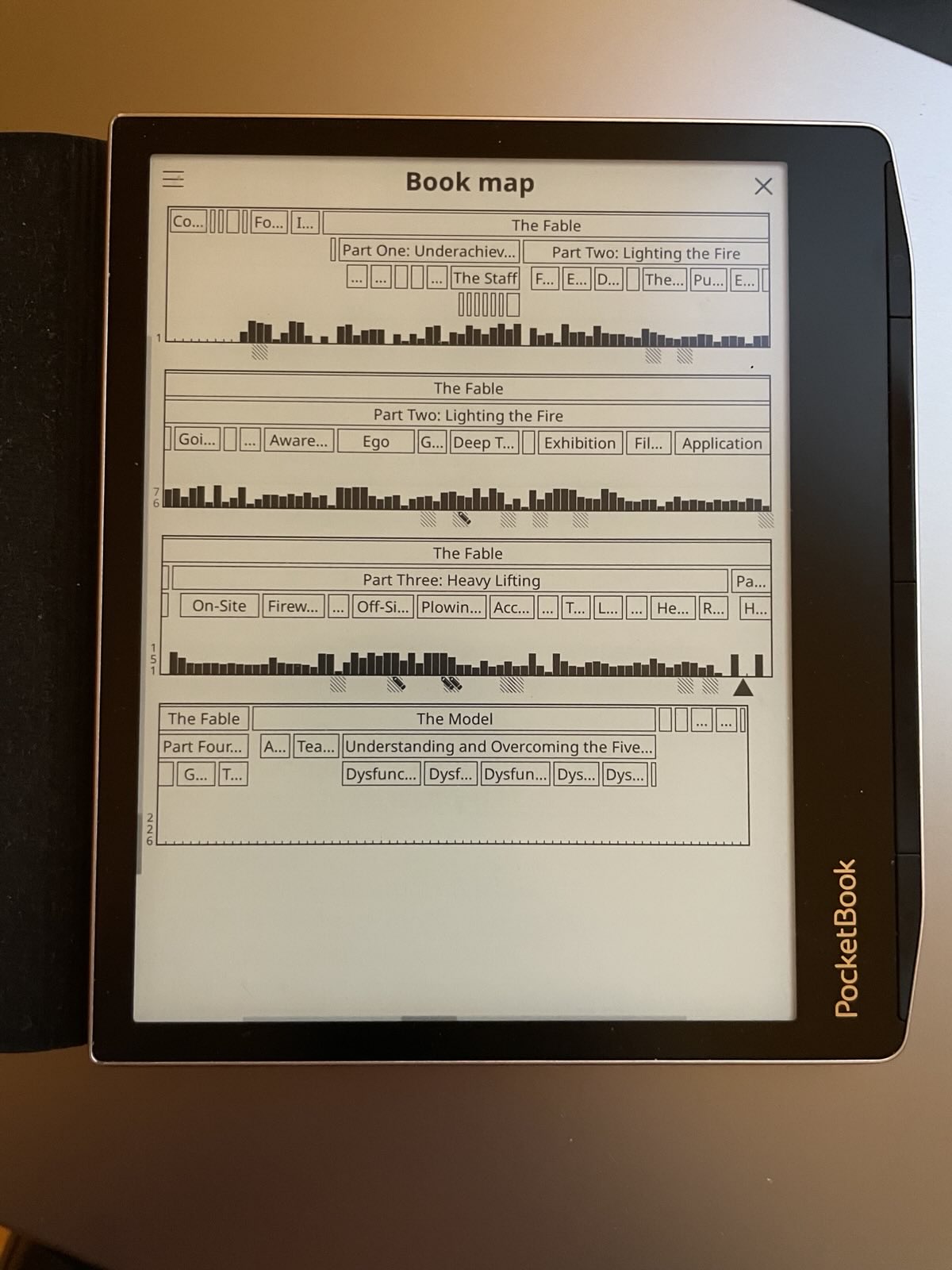
The thing I find the most valuable on KOReader is something I haven't seen mentioned yet: the book map[0]

It shows you chapter and section divisions in a single screen, along with black bars to show you which pages and chapters you've spent a lot of time on. I use this very often to jump back to pages or chapters, or look at which parts confused me. It also visualizes where bookmarks and notes are. When you want to see a segment in more detail, you click there and it brings you to a 6-page zoomed-in view.

Let alone being more useful than the Kindle or Kobo UX, it's more useful than the book UX.

[0] https://www.tc3.dev/posts/pocketbook-era-with-koreader/IMG_6...
reply
OuterVale 8 hours ago
So good. I've built a plugin for it to allow me download books from my Jellyfin server on my Kindle 3 Keyboard (from 2010!). Was lovely for develop for and the wide compatibility of KOReader has made it a great investment.
reply
bezko 7 hours ago
No Windows? Is it a political choice or is there a technical limitation?
reply
spv 7 hours ago
Any macOS builds out there? I would really like to have one app that can open both ePubs and pdfs.

Don’t need the library feature to manage books like Books.app, just need a light and reliable reader.

reply
orsenthil 7 hours ago
Does it have Kindle X-Ray like features, like integration with Wikipedia or possibly integration with AI for contextual information?
reply
hi-im-buggy 6 hours ago
Yes, Wikipedia is included, and there are plugins for AI tools.
reply
a1o 9 hours ago
Did anyone made a comparison across different devices for running this? I am curious on what is the best device today to run it, and also the best when accounting for cost of the device too.
reply
siatko 8 hours ago
I use it since years on my PocketBook Touch HD 3. I especially like the statistics. You might not care about them, but I find them very interesting.
reply
joshstrange 8 hours ago
If you like the statistics you might enjoy BookOrbit. I'm a sucker for stats like this and love having them centralized so that it's not just on my e-reader (in case it dies or if I read on another compatible app that syncs progress/stats).
reply
haywalk 8 hours ago
I love KOReader! I use it on my Kobo Clara Colour with Calibre. Love Wikipedia lookup, customization options, and the fact that wifi is off by default.
reply
egeres 7 hours ago
I installed this because I wanted the sqlite database that track when I'm turning each page
reply
utopiah 9 hours ago
FWIW not only it is in itself nice but it evens has plugin system. Consider extending it and sharing back with the community!
reply
carlosjobim 10 hours ago
My wish is to see ebooks become first class citizens on all digital devices. Apple has a native ebook reader built in to their devices. It's cumbersome and bloated, but it's there. No web browser except Yandex has built in ebook support, even though it would be the easiest thing in the world. Android, Linux and Windows have no built-in ebook reader, as far as I know.

Murasaki [1] is the most performant and sleek ebook reader you can get for MacOS currently. It's magnificent, but the creator has regionally limited who can get it, unfortunately.

[1] https://genjiapp.com/mac/murasaki/index_en.html

reply
WillAdams 9 hours ago
The old Microsoft Edge had epub support, and even a nascent ebook shop and a nifty note-taking/annotation mechanism (there was even a restitution payment made for folks who had taken notes), but Microsoft gave up on it when they shifted to a rebadged Chrome.
reply
overflowy 9 hours ago
I really appreciate you mentioning Murasaki - thank you. I've been looking for something like this for a long time, because every single EPUB "reader" out there does so much more than just read EPUBs. This one does just that, I love it.
reply
wing-_-nuts 7 hours ago
to be honest, I use the calibre ebook viewer without bothering with calibre itself (so far) and I find it to be good at what it does
reply
overflowy 6 hours ago
I'm also using Calibre, but the ebook viewer is really clunky, I'm not a big fan.
reply
bigfishrunning 7 hours ago
To be fair, desktop linux doesn't really have built-in anything (except what's appropriate for a kernel, like filesystems and a TCP stack...). Many linux distributions package epub readers (calibre, okular, fbreader, bookworm), and they tend to be really easy to install.
reply
Lord-Jobo 9 hours ago
It doesn’t seem like it’s a huge ask imo, and I’m also pretty surprised that they have such limited support, a mostly text format like epub really should be simple to add functionality for.

Less surprising but still annoying is how many hoops you need to jump through to get a good reading experience for manga, particularly on macOS. I had to try many options that were either too buggy, too difficult to install correctly, various aggressive paywalls, or straight up don’t function with high quality scans.

Eventually I landed on one(will edit the name in when I have access to my laptop) that functions well but has some memory issues in importing books, possibly a memory leak.

Maybe I’ve just become shit at finding apps in the modern unsearchable age, but it really feels like reading of all types has diminished enough that we are an unserviceable market.

reply
Lord-Jobo 7 hours ago
*The software I landed on is Koodo Reader
reply
brokegrammer 8 hours ago
I installed it and I use Calibre to send books over wifi. Simple and sweet setup.
reply
dsr_ 7 hours ago
I use KOReader on everything except e-ink devices.

Linux desktop. MacOS laptop. Android tablets. Android phones.

Where-ever I am, I can pick up a device and continue reading from where I left off. I have the same config everywhere (it would be nice to be able to distribute that) for gestures and taps. I use the same font everywhere (TeX Gyre Pagella, which is a Palatino clone.)

Customization begets comfort.

reply
Eueudhsbsj32 6 hours ago
Why not on e-ink devices too?
reply
dsr_ 5 hours ago
Because I don't own any that I want to use.

I always have a phone, a laptop, a tablet or a desktop to hand. The tablet is a great device for reading comics as well as books. The phone is a terrible device for reasing comics, but fine for books.

reply
starvar2 9 hours ago
I installed it on my Kobo to have the syncing from Calibre. Works perfectly, no complaints.
reply
dmos62 10 hours ago
Use it both on my phone and on an eink Android tablet. Love it, especially the dark mode.
reply
jgtrosh 9 hours ago
I wish you could disable fullscreen (enable the navigation bar) on Android though :-(
reply
kyranjamie 9 hours ago
Amazing software. Makes a 10 year old Kindle of the best electronics I own.
reply
seeksilence 36 minutes ago
KOReader my king
reply
exe34 3 hours ago
I run this on a pinenote, and I love it. Only sad thing is that I started transitioning to Linux and then lost interest, so I've only got about 8GB for data on the Android partition. I use syncthing to sync a folder with my laptop, so I just push a pdf into the folder on the laptop and then it turns up on the pinenote in koreader.
reply
spiresofagartha 9 hours ago
It seems there's a native dictionary. How does it fare?
reply
Cider9986 9 hours ago
Good. You can install your own or download the free ones from settings.

It also searches Wikipedia.

reply
mlue-the-one 9 hours ago
The PDF support is just the right thing to have.
reply
timvdalen 9 hours ago
See also this discussion from earlier today, which might have prompted this submission: https://news.ycombinator.com/item?id=49094189
reply
arikrahman 7 hours ago
Koreader rocks indeed
reply
koojh 9 hours ago
KOREA!
reply
dtj1123 9 hours ago
It really does rock.
reply
KageFX 8 hours ago
Thank you for this
reply
dawdler-purge 25 minutes ago
[dead]
reply
borhensaidi 2 hours ago
[flagged]
reply
torment-nexus 5 hours ago
[dead]
reply