> Somehow I am one of those few very lucky people to have the opportunity of owning a 2.5 gig symmetrical line for my internet.
I'm not going to complain against more bandwidth (as a GenXer I stared my online journey at (IIRC) 9600bps (maybe lower): much celebration with V.32/V.90), but I'm curious to know how many residential use-cases can take advantage of that much bandwidth. Linux ISOs?
How many services allow that much speed on a single stream / (TCP) session? Maybe you could have five at 500 Mbps?
Certainly downloading security updates or games may be quicker, but I would think that above 500Mbps (and certainly 1 Gbps) there would be major diminishing returns. Is anyone regularly getting close to that utilization in their daily work / hobbies (and not just a momentary spike on patch Tuesday)?
I think going from something like 100 Mb download to 1 Gb is slightly overrated. You hit heavy diminishing returns. Symmetric Upload, for me, is what really changes your quality of life a lot. Uploading a youtube video suddenly isn't an event, it takes a few seconds. Want to upload an image in any chat? Done before you consciously see it uploading. Heavy commits are instant, even with a bunch of resources. It changed my behavior. I started uploading more stuff to remote servers because the cost in time got so much lower.
It’s great when experimenting with LLMs because I can quickly try new models and download from the internet almost as fast as if coming from my NAS.
Game updates are also a great use case. I don’t game often so when my friends want to play I often have to update the game. Some patches are 60GB or more. When they come down at full line speed that’s valuable time I’m getting back to spend with my friends in game.
This also locks me out of hosting my own “cloud” storage at home where it belongs - I don’t want to be out and waiting forever to get a file, so I stick to traditional cloud services for now. Slower than local storage on the LAN of course though.
A fiber isp is digging trenches soon. Cannot wait!
Let's say you're on a Meet call with a dozen of people, one of them presenting their screen to explain an ongoing incident. You're following along while checking your dashboards and code on a remote server. You're of course keeping Slack sessions in the background.
I don't think you'd be saturating a 2.5G bandwidth, but perhaps about half of it ?
If your family is also using it in parallel that could get close to full use.
This is closer to 1-10Mbps than 2.5Gbps. Slack is negligible bandwidth. Video conferencing is high compression, low bandwidth video.
The 1G and 2.5G lines benefit bulk file downloads.
I have been on Zoom and Google Meets calls with that many people on my laptop which has a Wifi connection of ≤400 Mbps (sometimes <200Mbps). You don't need >500 Mbps for online meetings.
Are you in meetings where everyone is sending 4Kp60?
lowres, please.
only 4K if the feed is from a full room with +10 people in it.
Even better is those can saturate as much bandwidth as possible while the rest of the family are uninterrupted with Netflix or video calls.
An interesting side effect is that bufferbloat becomes less of a problem - you’re more likely able to pull 1gbps without spiking your ping.
But to be honest unless you have a household with multiple people, it’s something you mainly notice occasionally with updates, backups, large assets, etc.
The fact that it's a monitor is a little bit irrelevant.
I think I'd have accepted having two cables from the get-go. And if I observed this problem, the first diagnostic I would do is to plug the Ethernet directly into the laptop.
Fewer technical pieces in a puzzle sometimes trumps ease of use.
I experienced this problem with a macbook and a thunderbolt dock. I had tried multiple different brands of docks and ethernet adapters, and various macbooks. One interesting thing I discovered is if I plugged a non-thunderbolt cable between the dock and the laptop, I would achieve full speed with no packet loss, so interestingly the issue doesn't occur over pure USB but only over thunderbolt.
This has got to be a bug on Apple's side right? Would be nice if they fixed it.
A different adapter which required less frequent acknowledgement fixed the problem for him.
It is quite a nice post which gets to the bottom of incredibly opaque behaviour of USB hubs.
This would reduce the established connection speed due to electrical noise from the monitor.
This was super surprising, have always thought ISPs are a super hard businesses. But good for you mate, good ISPs are lifesavers.
I have had the opposite experience with my ISP guys. One of the VMs I got as part of work only had IPv6 and to my shock my internet didn't have one. When I contacted my ISP they legit told "You can either have IPv4 or IPv6, but not both". Unfortunately I was on a 12 month plan and couldn't easily cancel so ended up working around using tailscale.
"if the speed of the drain from my adapter to my Mac is half a gig slower than the speed of the input, then you can imagine the buffer getting filled more and more until it overflows. Those are dropped packets, which result in a hard backoff when the router resends them, so you drop loads in speed. And that’s the reason for all of this."
With diagram https://blog.tymscar.com/studio-display-ethernet/bottleneck....
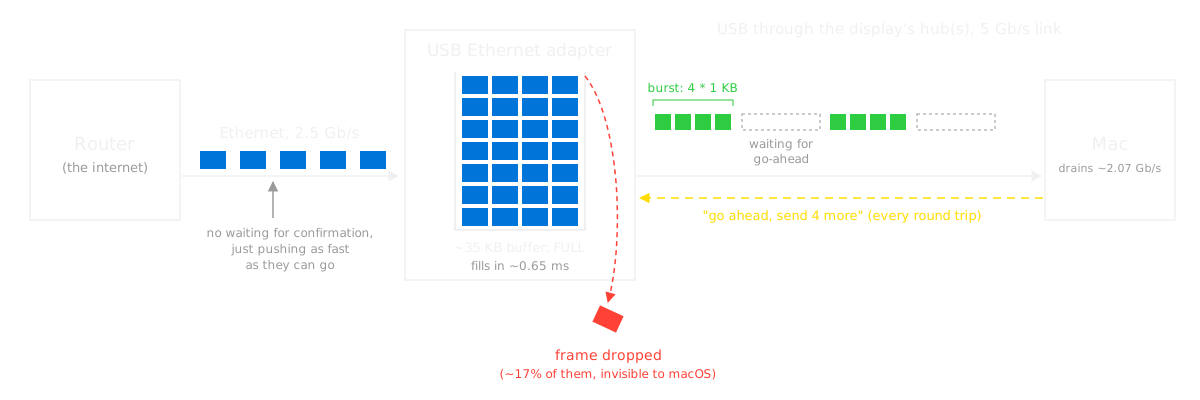
The monitor decides to send the adapter's packets on at only 2 Gbit/s, which leads to buffer overflow, thus packet loss, thus e.g. TCP congestion-control backoff.
The only thing we don't know is _why_ the monitor chooses to limit the bandwidth to those 2.07 Gbit/s (computed as the 41 KiB blocks per (7.6+8.2) µs). If it sent e.g. 81 KiB blocks, doubling the bandwidth, the problem wouldn't happen.
That'd be between Apple and the monitor.
It's explicitly not a bandwidth issue (that would also affect the SSD). It's a latency issue - the chip doesn't have a big enough buffer to keep sufficient packets in flight at once.
That's explicitly the opposite of what the author says.
"the speed of packets coming into the adapter is 2.5 Gbps. That’s what the router pushes in. The speed going out is around 2 Gbps."
Of course latency is always on the denominator side in the "bandwidth = data / time" equation, but it seems wrong to claim it's latency when it could also be improved by fixing the numerator; it's the entire fraction that's insufficient, thus bandwidth. As written:
"The reason is that if you add up the average time it takes to get the go-ahead through my monitor’s hub, which is around 7.6 µs, to the average time it takes to send 4 KB, around 8.2 µs, you can find what the maximum speed is"
And later, increasing the numerator is exactly what fixes it with the other hardware: "I can see that instead of sending 4 1 KB packets per burst, it would send 8!"
> the chip doesn't have a big enough buffer to keep sufficient packets in flight at once
How does this make sense? Even if his buffer was 100x larger, if the fill bandwidth exceeds the drain bandwidth, it'll eventually fill up. The article says that explicitly:
"Well, if the speed of the drain from my adapter to my Mac is half a gig slower than the speed of the input, then you can imagine the buffer getting filled more and more until it overflows."
"buffer" was perhaps a poor choice of words on my part, because "buffer" is ambiguous. In this case I am referring to the "transmit buffer", which is 4 in the non-working case and raised to 8 in the working adapter.
> Even if his buffer was 100x larger
"buffer" was perhaps a poor choice of words on my part, because "buffer" is ambiguous. In this case I am referring to the notional "transmit buffer", which is 4 in the non-working case and raised to 8 in the working adapter.
> "I can see that instead of sending 4 1 KB packets per burst, it would send 8!"
Increasing the number of packets in flight does not change the bandwidth, it only improves latency sensitivity (i.e. you can fire more data before requiring an ACK).
> it seems wrong to claim it's latency when it could also be improved by fixing the numerator.
Increasing the bandwidth without increasing the transmit buffer would not fix this issue. The adapter he ends up buying does both (allow 2x the packets in flight, and 2x the bandwidth).
The bottom line here is that the original adapter handles full duplex 2.5g when plugged into the laptop directly, and the SSD gets full duplex bandwidth in excess of 2.5g through the same intermediate link (i.e. the display), so both the adapter and the display have sufficient bandwidth. The added hop of latency however makes the short transmit buffer insufficient to cover the latency.
Sure we are talking about a different level in the networking stack and very different protocols. But with every component you add things get less synchronous. Well, no buffering needs to involved by the middleman, the mechanism for the throttling could also be different. What do I know...
The 35 KiB buffer from the article is not very large, and the problem would exist unmodified if it was smaller.
As the article explains, "if the speed of the drain from my adapter to my Mac is half a gig slower than the speed of the input, then you can imagine the buffer getting filled more and more until it overflows", and this would hold for any buffer, smaller or larger.
Bufferbloat causes primarily latency problems, not bandwidth problems.
Bandwidth problem would occur at most as secondary effects, e.g. if a packet is delayed by a buffer for so long that the sender-expected timeout for an ACK expires, it considers the packet lost, and throttles down sending. But that's not happening here.
1. These 1 cable solutions are nice but (IME) incredibly finnicky. I've gone through several Caldigit docks that have died;
2. When you think about it, these docks (and monitors) are really 100+ Gb/s switches. It's kind of no wonder that there are odd behaviors;
3. IME that cable that provides power to the laptop and handles power/video (you know, so it really is 1 cable) is the absolute worst. Whenever you buy them, buy 2-3 because I can almost guarantee 1 will be faulty and it'll be weird, annoying problems eg the screen gling black for a split second randomly;
4. I did a lot of testing with 1GbE USB-Ethernet adapters and it's true that they are not all created equal. In a perfect world, they should do ~930Mb/s. Depending on which one you get it'll be as low as 880 (or lower); and
5. I would honestly expect better from Apple. With the price premium you pay for these Studio monitors, I would expect the hub part to be pretty much seamless.
It's unreasonable assumption to expect such a setup to manage multiple full speed connects in my opinion.
If I was running support it and later heard on I just unplugged the ethernet from my monitor direct to my laptop and the speed improved I'd dispair.
The bandwidth in question is nowhere near saturating even a single USB3 connection.
At work we run HP Z40c monitors and while they've been bulletproof in terms of image quality, on my old laptop the mouse cursor was definitely more laggy when running in a one-cable setup. We're using Logitech MX Master combos so I just moved the dongle from the monitor to my laptop and that fixed the lag issue.
Wow this sounds like a shill post. If anyone from HP or Logitech wants to talk message me. Otherwise Logitech Opti+ or whatever its called can fk off.
(five minutes passed, I skimmed through TFA)
Ah yup, of course it's somehow related to USB.
It's like the infamous line: "It's always DNS" (and when it's not it's the firewall).
When download speeds are degrading like that, it's always some weird USB thing.
In the earlier days people didn't know that, for example, plugging a monitor into an USB hub could, as a result, make the rest degrade to USB 2.0 speeds. Unplug the monitor, HUB is speedy again now that it doesn't need to deal with that 4K / 60 Hz or whatever monitor data.
It's not a criticism or anything and I'm not saying that's what's going on here: I'm just saying USB has many gotchas and there can be, as in TFA and as in many other (document or not) cases, weird things happening.
At times (and doubly so when troubleshooting), you're better to simply try to plug your USB cable directly in the computer instead of in a USB hub / monitor USB hub. (EDIT: ah yup, ofc eventually he try that)
There are thing too complex to ever be secure and then there are things too complex to not have gotchas.
USB is... Wild?
P.S: and then of course in addition to this USB wildness there's the mad insanity of USB... Cables.
At the start of the game after an update, BG3 compiles the (Vulkan) shaders. To avoid hammering the computer, it checks the load, including I/O pressure, and then throttles itself. It turns out that Ghostty uses io_uring, and even if it's not doing anything this somehow counts as pressure. This was made worse by the fact that I usually have a dozen or so Ghostty windows.
End result, BG3 compiles shaders using 1 core, throttled, instead of all available 20 cores. Instead of a minute or so, it'd take several hours.
(For closure: I configured ghostty to use epoll instead. Probably not optimal but works around the problem.)
Especially for something like compiling shaders. It literally never happens unless the user is about to go play a game, which is going to consume most resources anyway. To the user, there's nothing more important running right now.
Well, to a certain degree. I have a relatively uncommon GPU, and run games on Steam (and Linux), so literally every game does shader compilation for me. Even with a beefy CPU and beefy GPU, if the shader compilation uses more than 16 threads, my computer basically freezes until its done with it, as it's so performance intensive, kind of have to throttle things if I want to be able to use the desktop for the 10 minutes the shader compilation takes sometimes.
Edit: "Do you use Linux? That only happened to me when I was using a dram-less ssd for swap and doing IO heavy operations on the NFS mounted drive"
I do! I do have NFS drives, but not for Steam games or anything else relevant. I'm also not using swap at all. RAM seems fine during this, it's just pegging all cores to 100% usage immediately and stays there, making everything else suffer.
Strange. This never happens to me on Windows. I only notice that the fans spin up a little because all cores are pegged.
Sounds like a scheduling problem that should be adressed at the OS level.
1. Have you tried enabling full preemption as well? I run Debian, and before I did that I had lots of stutters from any kind of background load thanks to dynamic preemption.
2. Even then, ZFS was causing stutters until I lowered it's priority as well (spl_taskq_thread_priority=0)
3. On non-ZFS drives, try setting your I/O scheduler to Kyber for NVME or BFQ for everything else. "mq-deadline" isn't great for interactive use on a SATA SSD, even for non-boot drives, and even NVME sometimes stutters under "none" for some people.
> I'm also not using swap at all.
4. zswap (combined with zstd compression, "min_ttl_ms=1000", and "vm.page-cluster=0") and "defer+madvise" memory compaction can help. (Something about the kernel really liking having swap on-hand.)
Steam runs shader compilations at batch policy and nice 19, so without RAM or I/O bottlnecks even gaming shouldn't be too bad (though from personal experience it still induces some stuttering). It's just most distros are tuned horribly for this. (Not to sound flippant, I understand the frustration of "just try this" and it doesn't work, but it's everything I can think of RN.)
But it's also possible that the problem is in the kernel and the shaders are actually doing some system call that's locking up the kernel. Like maybe there's a bug in your cuda or nvidia driver that's causing the kernel to lock.